Learning, also called training, is the mode where a neural network improves by working through many examples. For image generation, the examples pair captions with images; the aim is to make the model produce better results for that kind of task. Generation uses an already-trained model, while learning changes it. section 4.1.3 section 4.2
Figure 4.5 In learn mode Stable Diffusion works like a bad photocopier
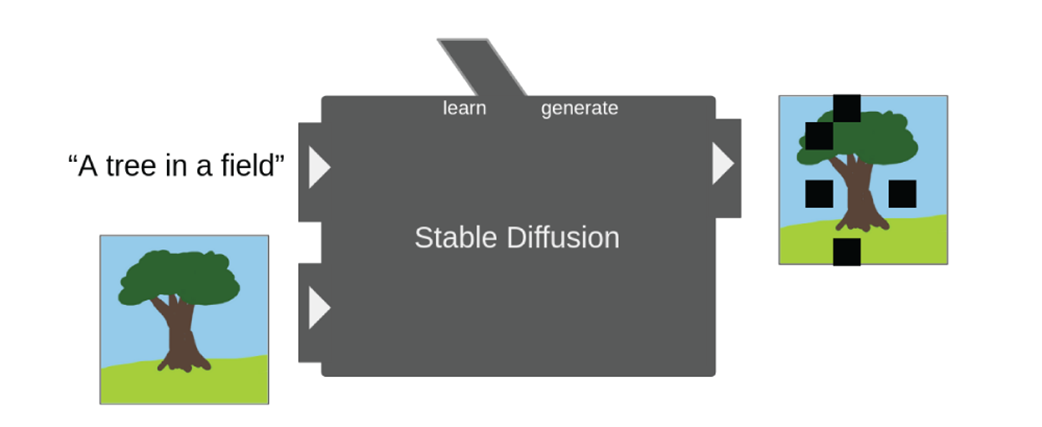
Learn mode takes both a prompt and its associated image. Its output is a noisy copy of that image—more bad photocopier than instant artist—but this setup lets the model improve. section 4.2
Under the hood, training repeatedly determines how the model’s weights should change for a better result, then updates them again and again. That extra bookkeeping makes training far more demanding than inference, the technical name for generating images. section 11.1
A practical LoRA training workflow looks like this:
- Collect high-quality images that show the subject across varied poses and environments, then write descriptive captions for them. section 13.6
- Choose a trigger word that fits the subject without colliding with something the model may already know. section 13.6
- Run the job and compare sample prompts from before training with later samples. section 13.4 section 13.6
- Select the earliest checkpoint that represents the subject correctly, while checking whether other subjects have become distorted. section 13.6
Training a custom Flux LoRA
A LoRA can add a custom subject or style without fine-tuning the whole diffusion model. AI-Toolkit training starts with labeled data and settings, then runs a job whose sample images help reveal whether the LoRA is learning the intended subject. Hardware matters: Flux LoRA training requires substantial VRAM, with 24GB cited as the starting requirement for this workflow. section 13.0 section 13.4