Automation replaces repeatable manual operational work with software-driven steps. A useful automation is more than a quick script: it should fit the task’s frequency and lifespan, account for implementation and upkeep, and remain useful as systems change. PowerShell supports this work through cmdlets, scriptable logic, and chained tasks across Microsoft services, Linux, and AWS. section 1.0 section 1.2
Decide whether and how to automate by working through the operational design first:
- Compare current manual cost against implementation and long-term upkeep. Consider task duration, frequency, relevance, tools, licenses, API changes, and upgrades. section 1.2
- Choose a trigger. Polling monitors check for conditions; schedules run at fixed times; event triggers respond to webhooks, requests, commands, or other automations. section 1.2.2
- Break work into reusable building blocks. Small components provide early value, reduce overwhelm, and can be improved across multiple automations. section 1.3.1
- Deliver in phases. Release a useful small version, gather feedback, and adapt later phases instead of waiting for a complete all-at-once solution. section 1.3.2
- Plan for failure and handoff. Walk manual work step by step, keep overall execution logic in the main script, make multistep workflows restartable, and document decisions. section 10.10
Maintainability comes from making behavior adaptable rather than hard-coding a single environment. Parameters can make functions reusable; error handling can resolve known conditions rather than only stopping execution; external configuration data can drive a combined workflow. Package related functions into a module so the automation has a clear, reusable structure. section 6.0 section 1.6
Server configuration automation
A server-setup workflow can install Windows features and roles, stop and disable unnecessary services, apply security-baseline registry settings, and configure the Windows firewall. Build the pieces as functions, use error handling around service changes, supply baseline settings as data, then combine the steps through a configuration file. Test system-changing code in a new virtual machine. section 6.0
Automation can serve people who do not run PowerShell directly. A web form can collect requests for account provisioning or deprovisioning, while a scheduled poll or webhook-triggered workflow processes them. The backend script can stay consistent even when the trigger changes; tool choice may introduce licensing or consumption costs. section 11.0 section 11.3
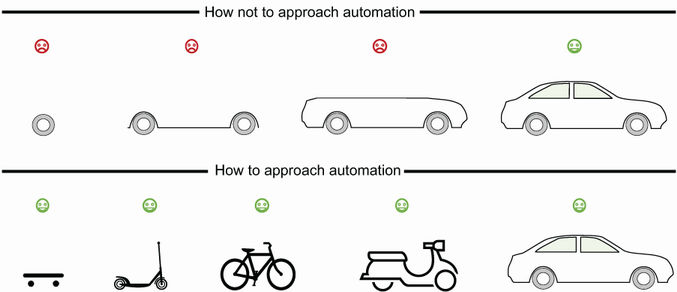
Use the phased-delivery diagram to compare immediate incremental benefits with the delayed payoff and rework risk of building the complete solution first. section 1.3.2


















