A dashboard turns workplace records into a clear view for monitoring progress and making decisions. An Excel performance improvement plan dashboard can organize objectives, actions, metrics, deadlines, milestones, statuses, and KPI scores in one updateable interface. section 16.1.3
A practical dashboard can include:
- Employee name, role, and department. section 16.1.3
- Objectives, action items, metrics, deadlines, milestones, and current status. section 16.1.3
- Bar graphs showing KPI scores over time and whether targets are being met. section 16.1.3
Prompt-driven dashboard
Ask an AI tool to create an Excel dashboard for a Senior Database Administrator’s performance improvement plan, then provide objectives, milestones, and action items when prompted. Review the generated template and add missing calculations before reuse. section 16.1.3
Figure 16.1 PIP-tracking dashboard
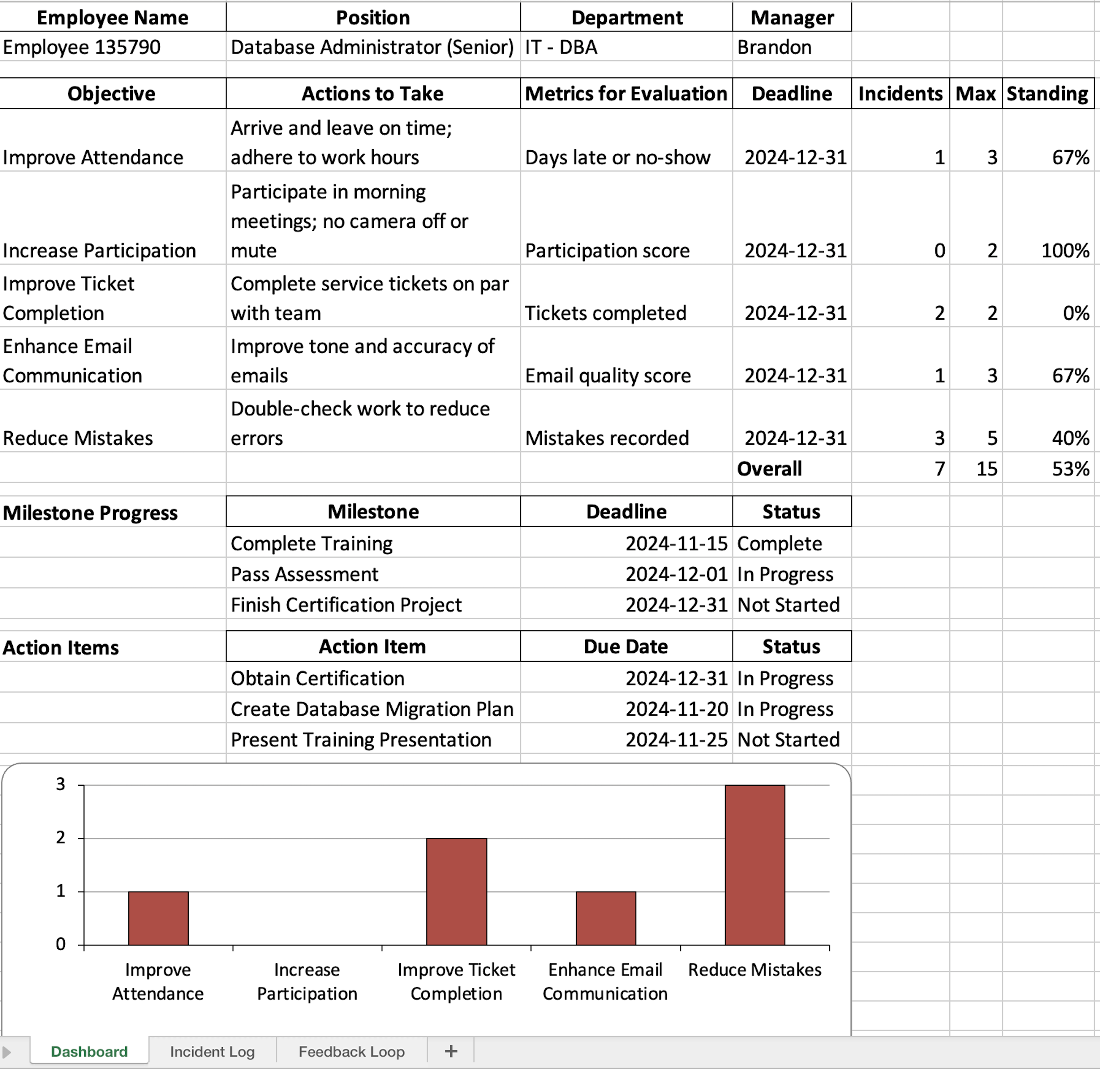
Use the PIP-tracking dashboard figure to inspect how progress information is arranged visually. section 16.1.3
Table 16.3 Performance improvement prompts
|
Task
|
Prompt
|
Response summary
|
|---|---|---|
|
Success predictor
|
The employee usually misses 3 days of work per month, usually on a Monday or Friday. They were late another 3 days per month on average, over the last 6 months. Their performance reviews have been “Needs Improvement” the last 2 years, but “Meets” the 2 years prior. Team feedback reflects that the employee is less engaged and less likely to assist in tasks and answer questions.
Considering the attendance record, ticket completion rates by month, performance review ratings, and team feedback for this employee predict the likelihood of the employee completing the PIP. Provide additional insights that can help refine the plan.
|
The AI model states that based on the available information, the outlook for the employee completing the PIP is challenging. It lays out key points, including attendance, performance reviews, team feedback, and inconsistent performance, and provides feedback on each topic. In addition, the AI model provides predictive insights and suggests regular check-ins, attendance incentives, soft skills training, workload adjustment, transparent metrics, peer support, and professional development.
|
|
Feedback loop organizer
|
Create a 2-month schedule to organize the feedback loop for a Performance Improvement Plan, starting from November 1, 2024. Include weekly check-in meetings, KPI reviews at the end of each month, and a final review meeting at the end of the plan. Specify the key activities to be conducted during these meetings, such as outlining PIP objectives, discussing challenges and progress, and making decisions on the next steps. Display the schedule in a calendar format and create a meeting invite file that I can download.
|
The AI model creates a schedule for the period, outlining which days to meet, and when to discuss key activities, objectives, challenges, and progress. A calendar .ics file is also created and presented for download, which requires an OpenAI premium account.
|
|
PIP outcome analyzer
|
I have attached a spreadsheet containing the results of a performance improvement plan. Compile a report evaluating the plan’s success based on the predefined metrics. The Standing percentage represents the number of incidents committed toward the maximum allowable. The higher the percentage, the better the rating. Based on the analysis, recommend appropriate next steps and state if the employee has met the agreed-upon requirements of the plan.
[Spreadsheet attachment]
|
The AI model creates a report from the spreadsheet. The response is a concise summary of the results of the PIP. The AI model states that the employee passed based on the criteria, except for ticket completion, which requires an intervention.
|
Use the performance-improvement prompts to compare success prediction questions with AI-generated analysis. section 16.1.3














