A dashboard presents selected metrics and information in a form that helps people monitor performance, explore data, and make decisions. An executive dashboard turns raw sales data into a focused story by showing important trends and comparisons. section 6.0 section 6.1.1
A practical metrics dashboard commonly combines:
- Global filters and date selectors that affect every displayed result. section 6.1.4
- Metric cards showing overall values. section 6.1.4
- Line charts showing change over time. section 6.1.4
- Pie charts or other breakdowns for dimensions such as product category or gender. section 6.1.4
Build the dashboard as a data flow: load raw CSV data, clean or rename columns, apply shared filters, transform the remaining data, and pass the results to each display. Pandas handles tabular manipulation, Streamlit supplies interactive widgets and layout, and Plotly supplies charts that Streamlit can display. section 6.1.4 section 6.6
Executive sales dashboard
A CEO can select a date range and other global filters, then compare current sales metrics, inspect a line chart of changes over time, and break results down by product category. The dashboard replaces an outdated paper report with up-to-date numbers that executives can analyze independently. section 6.1 section 7.1
Figure 6.3 Flow of logic and data in the dashboard
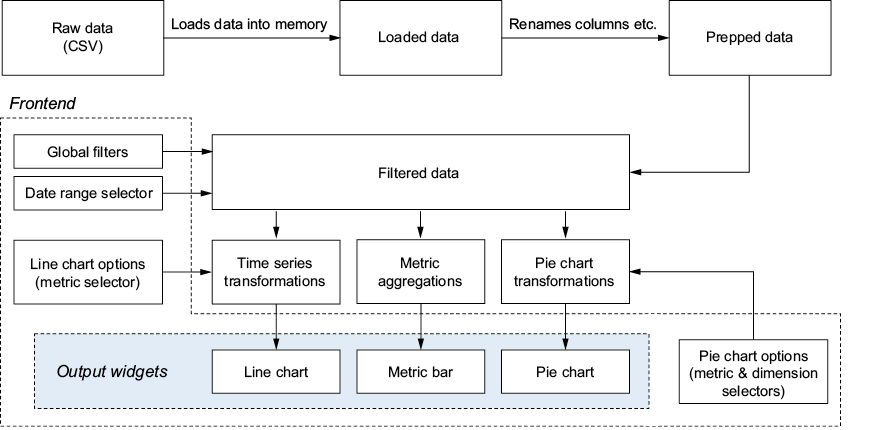
Follow the flow from raw data through global filters and transformations to metric cards and charts. section 6.1.4














