A dashboard is a visual consumption interface that combines charts and summaries for monitoring or analyzing data. In a lakehouse architecture, it can query governed Apache Iceberg tables through a federation engine such as Dremio. section 3.5 section 9.5.7
Build dashboards by separating visualization, query federation, governance, and storage responsibilities:
- Connect a BI tool such as Apache Superset to Dremio and expose an Iceberg table as a dataset. section 3.5
- Create charts from shared metrics, then arrange and publish them as a named dashboard. section 3.5.4
- Design for workload requirements: low latency and concurrency for interactive monitoring, or throughput for batch-oriented analysis. section 5.5.1
- Apply tenant filters, row-level security, caching, authentication, and audit controls when dashboards serve external or embedded users. section 9.5.3 section 9.5.8
Sales analytics dashboard
Use a fashion_sales dataset to create a line chart of SUM(sales_amount) by sales_date and a pie chart of SUM(sales_amount) by category. Arrange both charts in a Sales Analytics dashboard and publish it. section 3.5.4
Figure 3.18 A dashboard built from our Iceberg data in Superset
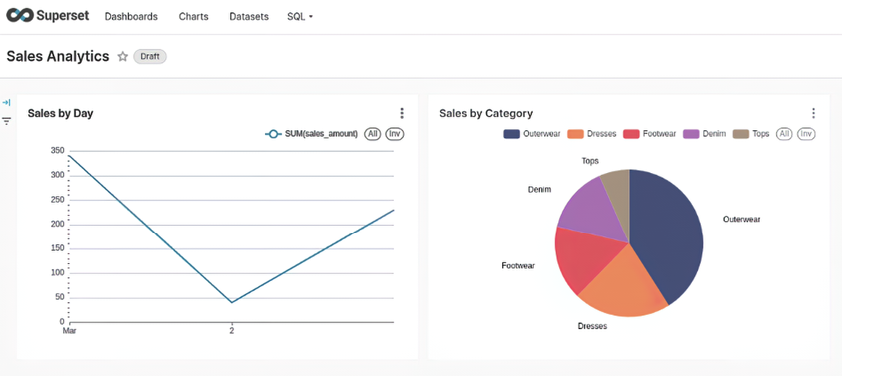
Shows a complete dashboard assembled from Iceberg data in Apache Superset. section 3.5.4














