Production systems need answers that logs alone cannot give quickly: how many requests arrived, how response times changed, or whether incoming model data has drifted. A dashboard turns collected measurements into a visual interface for checking those questions over time. It complements logs, which provide detail for debugging individual failures. section 3.5 section 6.2.2
Build the view from the measurements the system already produces:
- For an application, expose a `/metrics` endpoint, let Prometheus scrape it, then use Grafana to query Prometheus and chart the results. The Prometheus UI is useful for checking scraped values; Grafana is the dashboarding tool. section 3.5
- For batch inference, generate an Evidently drift report from current features and reference training data. Add its results to a dashboard on each pipeline run; filter the view to inspect changes over time. section 6.2.2
- For an instrumented RAG application, inspect Langfuse traces, costs, and latency to find usage patterns and guide retrieval or resource optimizations. section 12.4.3
Chart requests by response code
A Grafana query can sum the increase in `starlette_requests_total` over `[10m]`, grouped by `response_code`. The resulting time-series chart shows recent request counts; if every response has the same status code, it shows one line. section 3.5
Figure 3.17 Application 1 and Application 2 expose an endpoint for metrics. Prometheus scrapes those metrics, which are then visualized by Grafana. Alertmanager uses those metrics to check if any alerts need to be routed to a channel; in this case, it’s an email.
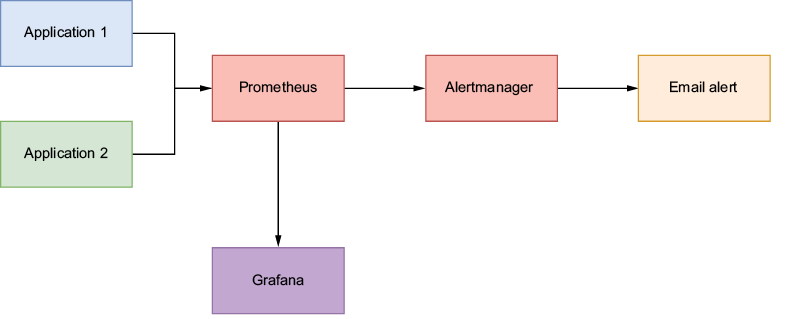
Follow the monitoring path from application metrics endpoints through Prometheus scraping to Grafana visualization; Alertmanager handles the separate notification path. section 3.5
Choose panels for decisions, not decoration. Resource and request metrics support service monitoring; application-specific metrics add context. Pipeline metrics made visible in a shared dashboard shorten feedback loops, while drift panels help check whether new data still resembles the reference data. section 11.4 section 8.2 section 6.2.2














