A dashboard is a collection of visualizations that summarizes information relevant to a business problem for rapid inspection. It is an assistive interface: its purpose is to help people consume information and make decisions, not merely to display data. section 9.2.1
Decide what the interface must help users do before building it:
- Identify the business views and their users. Inventory may need a detailed view, while customer churn needs a different one; prioritize ease of use. section 4.9
- Choose whether the view needs aggregates and selection filters or also needs ML model output. An intelligent dashboard can add predictions based on user-selected values. section 9.2.1
- Check the intended interface against customer needs and model feasibility before committing to implementation; bring any change of direction to stakeholders at a project checkpoint. section 9.10
Exploring customer churn
A user selects values for competitor activity and sales investment. An intelligent dashboard displays churn-model predictions so the user can inspect likely outcomes and consider whether greater sales investment could reduce churn. section 9.2.1
Figure 9.2 A simple dashboard on the left versus an intelligent model-driven dashboard on the right
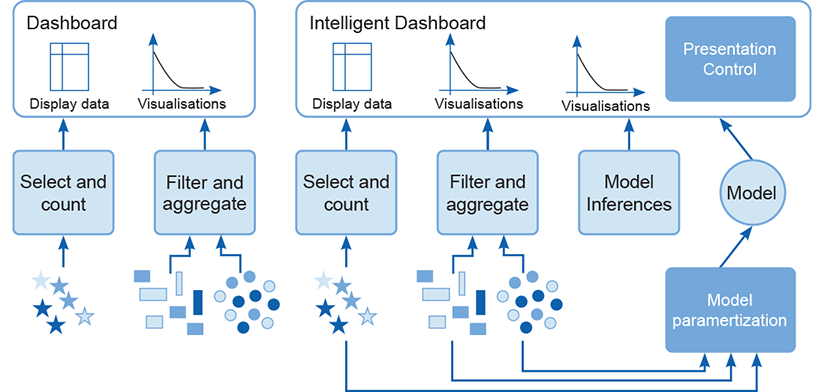
Compare a dashboard based on transformed and filtered data with one that also displays ML-derived output. section 9.2.1














