A dashboard presents selected data as coordinated charts and summaries, giving users a quick view of important metrics while supporting interactive investigation. In a data workflow, it provides an accessible alternative to querying DuckDB directly and can support insights or decisions without requiring application code. section 9.0 section 9.2.3
A Superset dashboard is assembled through a layered workflow:
- Connect a database such as DuckDB and expose its tables. section 9.2.2 section 9.2.3
- Create datasets from tables or saved SQL queries. section 9.2.2 section 9.2.4
- Build charts from those datasets, then add the charts to a dashboard. section 9.2.2 section 9.2.4
- Use filtering, zooming, panning, or alternate chart representations to inspect the displayed data. section 9.0 section 9.1.5
ATP dashboard
Connect Superset to an ATP DuckDB database, select the matches table, create a dataset, and choose a bar chart showing matches played per year from 1967 to 2023. Add a second dataset from a query that counts Grand Slam winners aged 30 or over, visualize it with Big Number with Trendline, and add it to the same dashboard. section 9.2.3 section 9.2.4
Figure 9.12 Terms used by Superset and their relationships
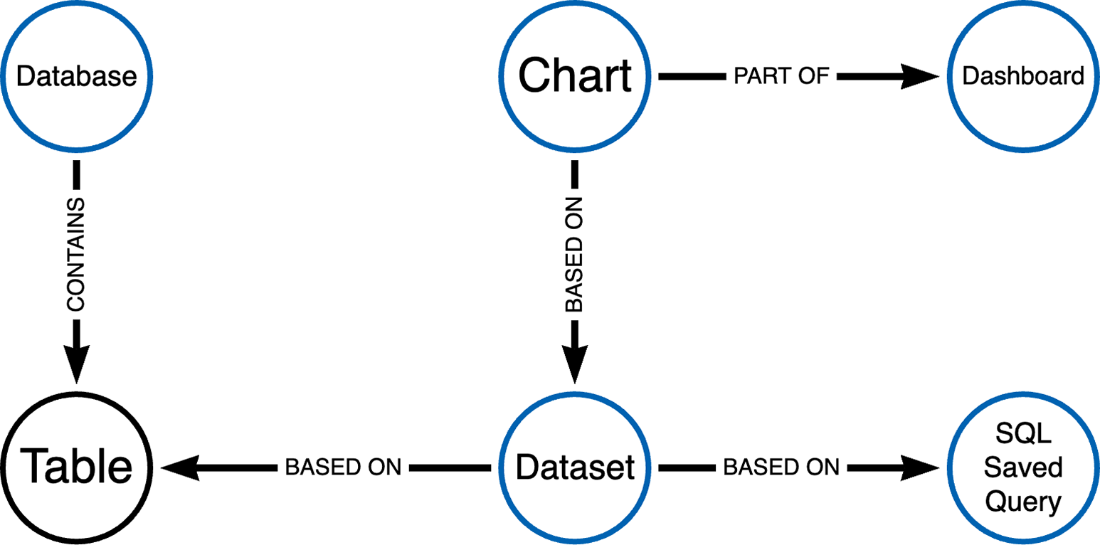
Use the relationship diagram to navigate from database and SQL saved query through datasets and charts to the dashboard. section 9.2.2
Dashboards can also be exported as ZIP archives containing database, dataset, chart, and dashboard configuration, then imported into another Superset environment instead of being rebuilt manually. section 9.2.5














