A dashboard organizes application measurements into visual panels so you can see what is happening and spot problems quickly. In a containerized monitoring setup, Prometheus collects metrics, PromQL queries them, and Grafana turns the results into user-friendly visualizations. section 9.4 section 9.0
Build a useful dashboard by following this workflow:
- Capture application metrics according to the runtime and the application's operational needs. section 9.4
- Use the Prometheus UI to inspect recorded metrics and develop queries for the measurements you need. section 9.4
- Add each query to a Grafana panel; visualizations can use filtering and aggregation without complex PromQL. section 9.4
- Keep a summary dashboard with the most important application data, then add infrastructure and component dashboards for deeper investigation. section 9.5
Run and inspect a Grafana dashboard
Set HOST_IP, start the Compose configuration with Grafana, generate requests, and open port 3000. Sign in with the initial admin credentials, open the home dashboard, and inspect the application visualizations. A custom Grafana image can package the Prometheus data source, dashboard provider, and dashboard JSON for repeatable startup. section 9.4
Figure 9.11 The Grafana dashboard for the app looks fancy, but it’s actually pretty simple to build.
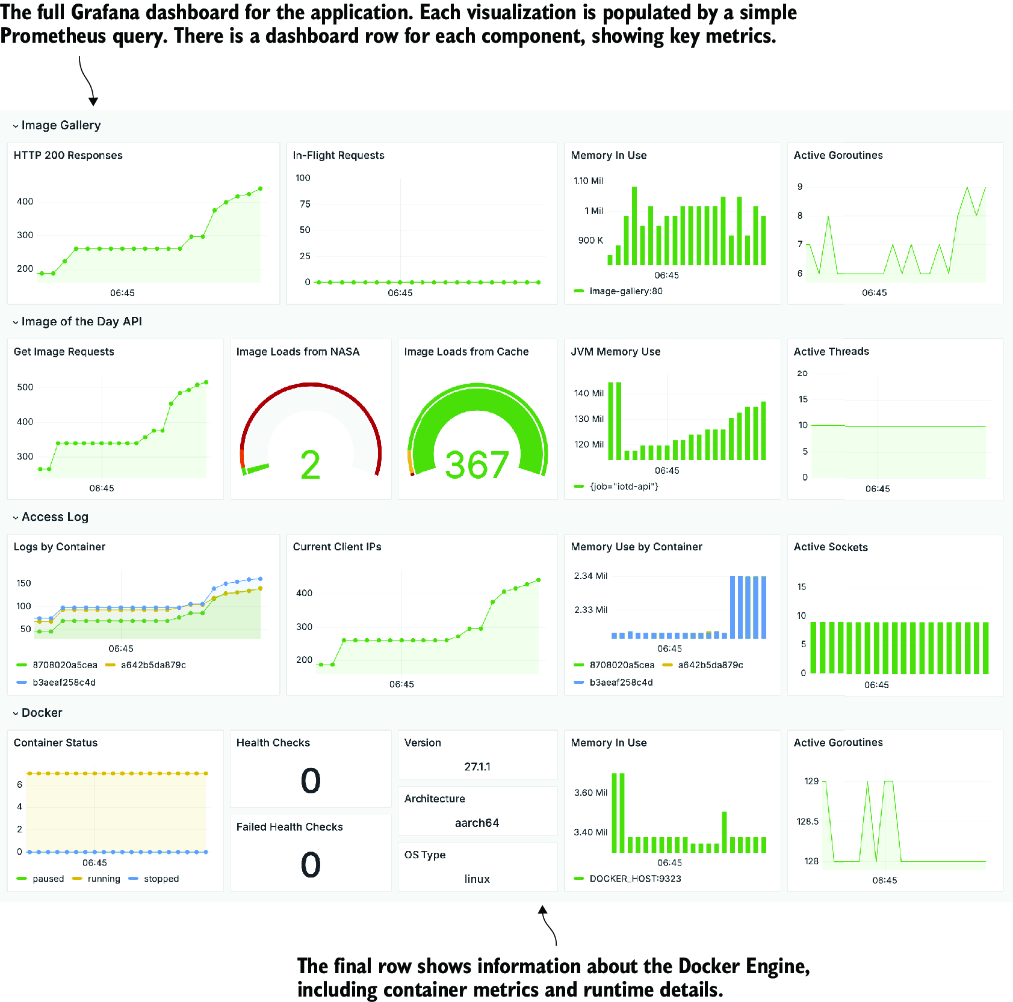
Use the dashboard figure to relate the overall layout to the application and Docker runtime measurements. section 9.4
A dashboard should support action, not merely display data: the summary view reveals whether something is wrong, while detailed views help locate the affected infrastructure or application component. section 9.5














