A performance threshold is a predefined limit that marks acceptable behavior for a measured resource or experience. It becomes useful only when the metric, population, conditions, and measurement point are explicit: “under 200ms for 95% of search users” is actionable, while “make the API faster” is not. Thresholds turn a shared intent into a result that engineers, reviewers, and automated checks can interpret consistently. section 3.1.1 section 6.2
Performance goals describe the user experience to achieve; budgets translate that goal into a tighter threshold for code changes. A 3-second load-time goal might yield a 300KB compressed initial-JavaScript budget if that is what the architecture can deliver. The budget catches regressions before users notice and makes each added dependency, query, startup task, or memory cost an explicit trade-off. section 6.0 section 6.1
Choose a threshold that is measurable, realistic, and useful for decisions:
- Measure a resource that directly affects users, such as JavaScript size, response time, query time, startup time, memory, or input responsiveness. section 6.2
- Set the budget tighter than the user-facing goal, commonly leaving a 15–25% buffer to detect degradation early. section 6.4
- Base the initial limit on current performance and architecture; when the target is far away, tighten in achievable phases rather than enforcing an immediately unreachable number. section 6.4 section 6.8
- Preserve headroom for future work, and trigger cleanup when remaining capacity becomes too small. section 6.4
- Match granularity to meaningful variation: start globally, then add route-, endpoint-, feature-, phase-, or state-level thresholds where aggregate metrics hide user pain. section 6.3 section 6.3.4
A checkout API threshold
A checkout endpoint has a p95 response-time goal of 200ms. The team enforces a 150ms budget, leaving room before the user-facing goal is missed. If processing, serialization, and network work consume roughly 50ms, database queries share the remaining 100ms. Rather than accepting one 95ms query inside that total, individual query thresholds expose the dominant query and prompt indexing, query restructuring, caching, or parallel work. section 6.4 section 6.2.5
Thresholds need governance as well as numbers. Record significant changes, their rationale, approval, conditions, and remaining headroom where the team can find them. When violations persist, distinguish legitimate product growth from accumulated bloat; reset deliberately below current performance and review limits regularly instead of silently raising them. section 6.5.2 section 6.8
Figure 6.1 Key performance budget types by platform. Memory usage is the only budget that applies across all platforms.
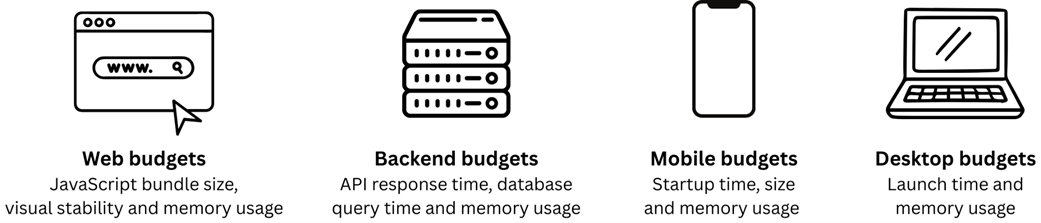
Compare budget categories by platform when selecting the resource whose threshold most directly protects the user experience. section 6.2