A metric is a numerical signal, typically sampled at regular intervals. It usually combines a name, value, metadata for context, and a timestamp supplied by the producer or at ingestion. section 2.4
Labels organize dimensions such as location, status code, URL path, or method. This flat, label-based scheme is flexible, but excessive label combinations create cardinality and storage costs. section 2.4 section 2.4.3
Metrics support several operational roles and questions:
- Track systems resources such as CPU utilization and allocated memory; use application or business metrics for requests per second or revenue per user. section 2.4
- Establish baselines, define alerts for unexpected values, and study trends or histograms for capacity and scalability planning. section 2.4.4
- Measure operational goals through service level indicators, such as an error-rate ratio used to assess a service level objective. section 2.4.4
- Give dashboards and alerts a broad view, then correlate a metric with traces and logs to investigate a particular request or suspected change. section 1.5.2 section 1.3
Prometheus popularized pull-based collection: a central component scrapes an HTTP endpoint, commonly /metrics. OpenTelemetry commonly retains pull-based ingress while pushing data toward a backend. Auto-instrumentation reduces effort; manual instrumentation adds control and is often necessary for business metrics. Both instrumentation and storage require attention to overhead, retention, federation, and cardinality. section 2.4 section 2.4.3 section 4.2
Instrumenting an echo service
A small Go HTTP echo service can count successful and failed invocations with a Prometheus counter vector labeled by HTTP status. Prometheus can scrape the resulting endpoint, while Grafana visualizes the values. Generate repeated requests to create traffic, then use the metric to observe error behavior. section 2.1 section 2.4.1
Listing 2.7 Example Go program, instrumented to emit Prometheus metrics
func handleEcho(w http.ResponseWriter, r *http.Request) {
    message := r.URL.Query().Get("message")
    log.WithFields(log.Fields{
        "service": "echo",
    }).Info("Got input ", message)
    if rand.Intn(100) > 90 {
        log.WithFields(log.Fields{
            "service": "echo",
        }).Error("Something really bad happened :(")
        invokes.WithLabelValues(strconv.Itoa(http.StatusInternalServerError)).Inc()#1
        w.WriteHeader(500)
        return
    }
    invokes.WithLabelValues(strconv.Itoa(http.StatusOK)).Inc()                     #1
    fmt.Fprintf(w, message)
}
var (
    registry = prometheus.NewRegistry()                                            #2
    invokes  = promauto.NewCounterVec(                                             #3
        prometheus.CounterOpts{
            Name: "echo_total",
            Help: "Total invocations of the echo service endpoint.",
        },
        []string{"http_status_code"},
    )
)
func main() {
    rand.Seed(time.Now().UnixNano())
    registry.MustRegister(invokes)                                                 #4
    log.SetFormatter(&log.JSONFormatter{})
    http.HandleFunc("/echo", handleEcho)
    http.Handle("/metrics", promhttp.HandlerFor(                                   #5
        registry,
        promhttp.HandlerOpts{
            EnableOpenMetrics: true,
        },
    ))
    log.Fatal(http.ListenAndServe(":4242", nil))
}
Inspect the instrumented Go fragments showing labeled counters for successful and failed HTTP responses. section 2.4.1
Figure 5.2 Time series database concept, showing N time series of the mysvc_http_request_total metric
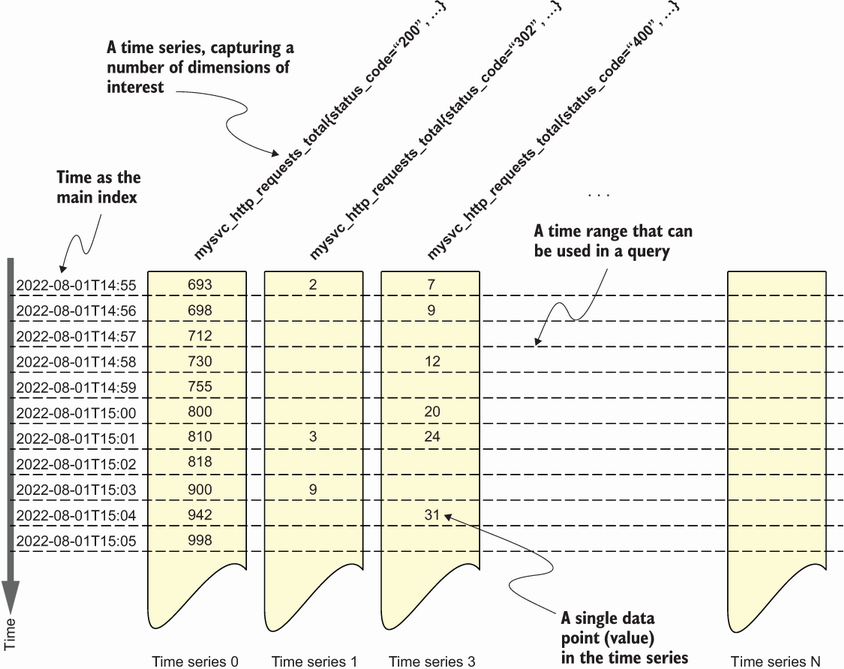
Use the time-series diagram to connect metric names, labeled series, timestamps, counters, and range queries. section 5.3







































