Performance is how effectively a data-processing system works under the conditions that matter: how long a computation takes, how much memory it needs, and whether it remains practical as data grows. Adding servers is not always a suitable fix. A workload that outgrows memory, for example, may require changes to storage and code rather than simply more machines. section 1.1 section 2.6
Measure a baseline before optimizing. Profile code to find where time is spent, then benchmark a proposed change on representative data. Measure memory as well as time: using less memory can sometimes keep an entire computation in memory and produce a large speed gain. Results depend on the data, machine, and implementation, so a benchmark is evidence for its tested conditions—not a universal ranking. section 2.2 section 2.6 section 7.1.1
When a baseline is too costly, investigate the kind of cost before choosing a remedy:
- Algorithm and data structure: estimate how time and memory grow with input size. Even built-in Python operations differ in cost; an algorithm that scales poorly may need replacing. section 5.6.3 section 2.3.3
- Execution path: examine whether critical work runs in Python or in NumPy and its underlying libraries. Cython offers a way to reimplement critical Python code and profile the result. section 4.3 section 5.0
- Data movement: account for CPU caches, main memory, storage, and networks. Their costs can overturn an intuition based only on the number of arithmetic operations. section 6.0 section 6.1.1
- Partitioning: examine the work implied by splitting data, not just the available processing infrastructure. Distributed operations have algorithmic costs even when the execution platform changes. section 10.2
Equal-sized operations, unequal times
Doubling one row or one column of a square NumPy matrix touches the same number of elements. On the reported machine, the operations took roughly 715 and 750 ns for a 100-by-100 matrix. At 10,000 by 10,000, they took 74.9 and 4.51 µs, respectively: the column operation was about 16 times faster. CPU-cache behavior and NumPy’s matrix representation explain why counting operations alone misses the difference; another machine may produce different timings. section 6.1.1 section 5.6.2
A loading trade-off
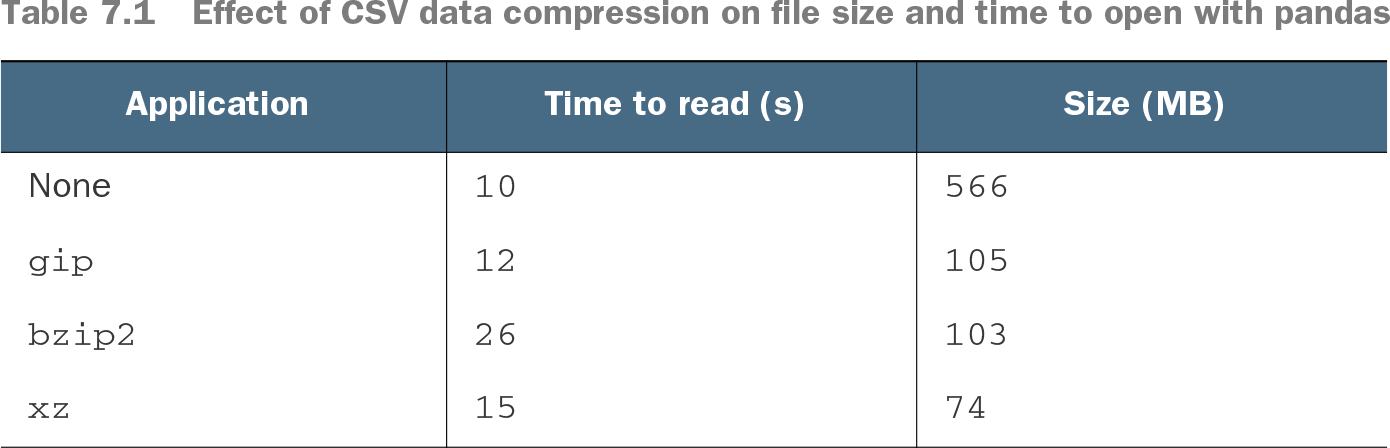
For one CSV dataset loaded with pandas, the uncompressed file took 10 seconds to read and occupied 566 MB. An xz-compressed version took 15 seconds but occupied 74 MB. Compression can reduce storage substantially without improving read time; test the trade-off with the data and constraint that matter. section 7.1.1
Table 7.1 Effect of CSV data compression on file size and time to open with pandas (view table figure)
Compare measured read times and file sizes across four compression choices; neither smallest file nor fastest read is a complete performance answer. section 7.1.1