liveBook · Manning

Performance

As explained in Build Python Web Apps with Streamlit

A metric is a quantified measure used to describe or evaluate a phenomenon, process, or outcome.

Performance metrics turn complex business activity into a few numbers that reveal whether results are improving, declining, or demanding attention. section 6.4

Use metrics to:

  • Monitor revenue, profit, growth rate, customer-acquisition cost, sales, or other important outcomes. section 6.4
  • Show selected values prominently while filters and date ranges control the data slice being examined. section 6.1.3 section 6.1.4
  • Compare a value with a previous period so its significance becomes clear. section 7.4

A CEO dashboard

A dashboard can display four key metrics, a time-series chart for change over time, and a pie chart breaking sales or gross margin down by product category or another dimension. section 6.1.3

Figure 6.2 A UI mock for the dashboard
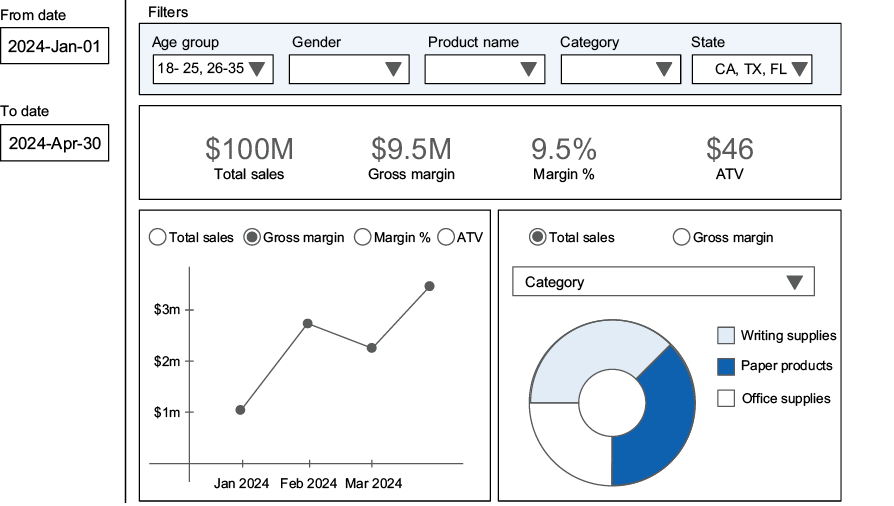
Inspect the dashboard mockup to see how prominent metric values, filters, date ranges, and charts work together. section 6.1.3


How Build Python Web Apps with Streamlit covers it

How deep it goes
Defines metrics, names calculation and display as implementation steps, and adds comparison for meaningful interpretation.
Examples
Uses revenue, profit, growth rate, customer-acquisition cost, sales, gross margin, product category, and gender breakdowns.
What you can do after
Build it into an interactive Streamlit dashboard with calculated values, filters, date ranges, and visual comparisons.
How it connects
Connects metrics to dashboards, key performance indicators, filtering, data aggregation, time-series charts, and data visualization.

Also explained in

Compare how 40 books explain performance →

Related concepts

This explainer was generated by Manning's knowledge graph from the text of Build Python Web Apps with Streamlit. The section links point to the parts of the book it draws on.





































