Performance metrics quantify how an Airflow installation behaves in production. A useful starting point is measuring the delay between queuing a task and executing it, then displaying the results in a dashboard. section 15.7
Organize monitoring around four signals:
- Latency: measure durations such as web-server response time or the scheduler's transition from queued to running. section 15.7.5
- Load: measure demand through quantities such as tasks processed or available pool slots over time. section 15.7.5
- Errors: count failures such as zombie tasks, non-HTTP 200 web-server responses, and timed-out tasks. section 15.7.5
- Saturation: measure used capacity, including CPU load and currently running tasks, against a known upper boundary. section 15.7.5
Metrics form one part of observability alongside logs and traces. Tracing requires additional, environment-dependent setup, so metric monitoring can begin with system and Airflow components such as the scheduler, web server, tasks, DAGs, and metastore. section 15.7 section 15.7.5
Prometheus can collect and store metrics for visualization in Grafana. StatsD or OpenTelemetry can instrument Airflow, while exporters expose machine, database, and Celery signals. section 15.10 section 15.7.5
Figure 15.9 An example visualization of the number of running tasks. Here, parallelism had the default value 32, to which the number of tasks sometimes spikes.
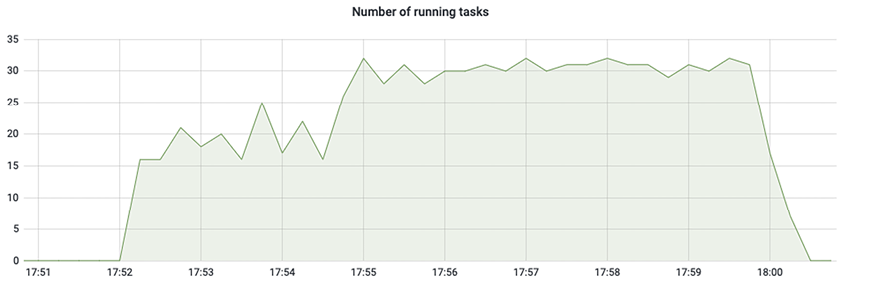
Use the running-task chart to compare observed task activity with the configured parallelism value and identify spikes. section 15.7







































