An HttpClient handler pipeline gives outgoing HTTP requests a place for shared behavior, such as authentication, logging, or retrying temporary failures. HttpClient passes each request through a chain of HttpMessageHandler instances. The final HttpClientHandler makes the network request; on the way back, each handler can inspect or modify the response. section 33.2.1 section 33.4
Figure 33.4 Each HttpClient contains a pipeline of HttpMessageHandlers. The final handler is an HttpClientHandler, which makes the connection to the remote server and sends the HTTP request. This configuration is similar to the ASP.NET Core middleware pipeline, and it allows you to make cross-cutting adjustments to outgoing requests.
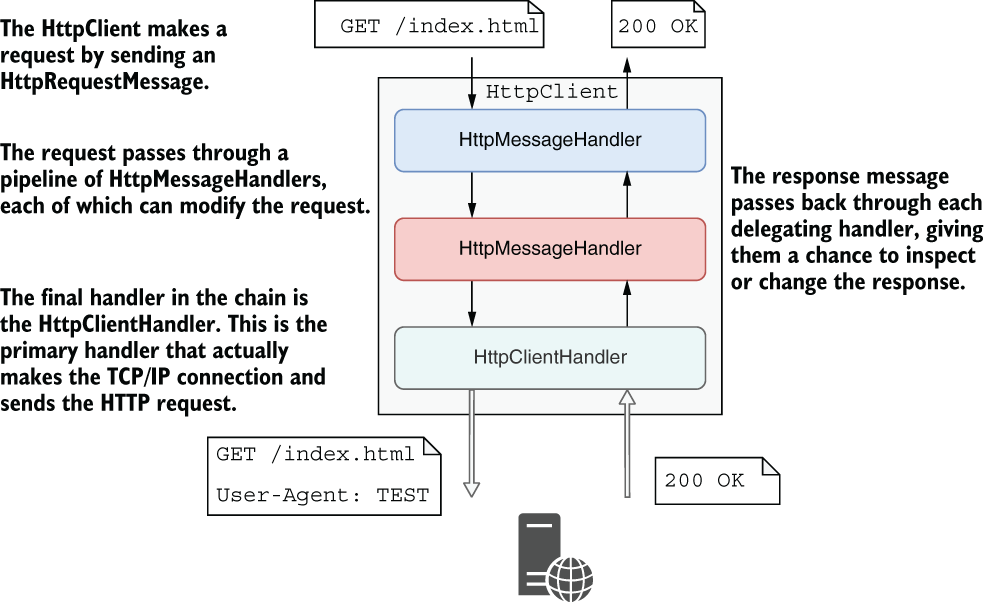
Follow the request through the handlers to the final transport handler, then trace the response back. section 33.2.1
To add behavior for a named or typed client:
- Derive a handler from DelegatingHandler and override SendAsync(). Change the request as needed, then call base.SendAsync() to continue through the pipeline. section 33.4
- Register the handler with dependency injection, then add it with AddHttpMessageHandler<T>(). Registration order determines its position in the pipeline. section 33.4
- For transient HTTP errors, add a retry policy through Microsoft.Extensions.Http.Polly instead of writing retry logic at every call site. section 33.3
Add an API key to outgoing requests
An API-key handler can add an API-KEY header before calling base.SendAsync(). Register it for a typed client so every request from that client passes through it. A retry handler can be added to the same pipeline. section 33.4
Listing 33.10 Registering a custom handler in Startup.ConfigureServices
WebApplicationBuilder builder = WebApplication.CreateBuilder(args);
builder.Services.AddTransient<ApiKeyMessageHandler>();       #1

builder.Services.AddHttpClient<ExchangeRatesClient>()
    .AddHttpMessageHandler<ApiKeyMessageHandler>()           #2
    .AddTransientHttpErrorPolicy(policy =>                   #3
        policy.WaitAndRetryAsync(new[] {
            TimeSpan.FromMilliseconds(200),
            TimeSpan.FromMilliseconds(500),
            TimeSpan.FromSeconds(1)
        })
    );
#1 Registers the custom handler with the DI container
#2 Configures the typed client to use the custom handler
#3 Adds the transient error handler. The order in which the handlers are registered dictates their order in the pipeline.
The registration example places an API-key handler and a transient-error policy on one typed client. section 33.4
IHttpClientFactory manages the underlying handler pipeline separately from individual HttpClient instances. It pools handlers and periodically replaces them to address socket exhaustion and DNS changes. This is an outbound pipeline; ASP.NET Core middleware handles incoming requests, while endpoint filters run only for requests that reach their associated endpoints. section 33.2.1 section 5.4.2















































