A pipeline coordinates data-processing activities that depend on one another. In Airflow, it is represented as a directed acyclic graph (DAG): tasks are nodes, and directed edges specify which tasks must finish before others can proceed. Independent tasks can run in parallel instead of being folded into one large script. section 1.2.1 section 2.2
Download, process, notify
A rocket-launch pipeline downloads launch data, retrieves the associated pictures, then sends a notification. Its ordering can be written `download_launches >> get_pictures >> notify`. Splitting the work this way makes dependencies explicit; choosing three tasks rather than one or five is a design decision, not a fixed rule. section 2.2
Define the tasks, dependencies, and execution metadata in a DAG file. Airflow parses the file, schedules eligible tasks, and assigns work to workers; its interface lets you monitor runs. A schedule can make the pipeline recur, while a pipeline with `schedule=None` need not run on a recurring timetable. section 1.2.1 section 1.2.3 section 2.2
Figure 1.9 Developing and executing pipelines as DAGs using Airflow. When the user has written the DAG, the DAG processor and scheduler ensure that it is run at the right moment. The user can monitor progress and output at all times while the DAG is running.
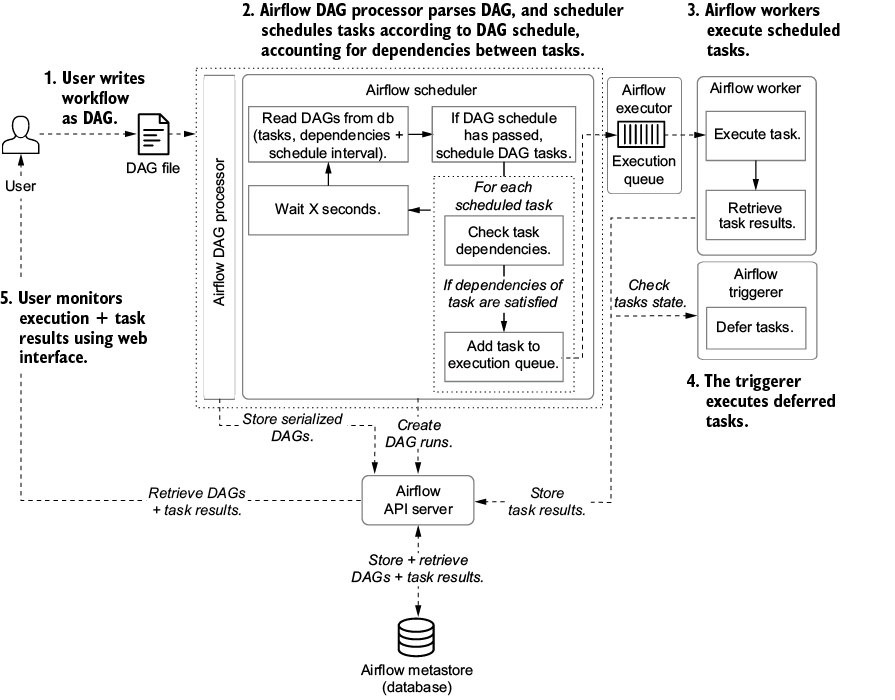
Follow the DAG from its definition through scheduling and execution, with progress available for monitoring. section 1.2.3
Use this approach for recurring or batch-oriented work, such as copying data to S3, training a model in SageMaker, and deploying it when data or the model changes. Airflow coordinates those services, but their integration still needs configuration. It is less suited to processing individual streaming events in real time; large code-defined DAGs also need careful modularization. section 8.2.2 section 1.3.2















































