A pipeline is an ordered sequence of processing stages that moves data or executes computational tasks. In PowerShell, the pipe character sends one command’s result into another command; in Azure AI, a pipeline carries data through ingestion, labeling, training, or deployment steps. section 5.3.3 section 7.4.2
When configuring a pipeline, keep these responsibilities in view:
- Define the input and output: a PowerShell pipeline passes command results, while an AI pipeline consumes connected storage data. section 5.3.3 section 7.4.2
- Grant only the permissions required for the stages: AI Foundry needs Blob Data Contributor access to list, read, and write review files. section 7.4.2
- Use a shared workspace to organize datasets, compute, pipelines, deployment definitions, security, and model histories. section 7.4.1
Filtering blob names with a PowerShell pipeline
Get-AzStorageBlob -Container bannedbooks -Context $storageContext.Context | select Name The first command produces the blobs in a container; the pipe passes that result to select Name, producing a focused dataset for output or further processing. section 5.3.3
Figure 5.9 The anatomy of a PowerShell pipeline command
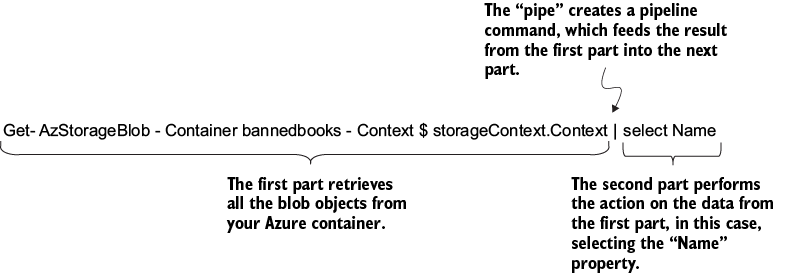
Use the pipeline anatomy figure to follow how a PowerShell command’s result becomes the next command’s input. section 5.3.3















































