liveBook · Manning

Container

As explained in Amazon Web Services in Action, Third Edition: An in-depth guide to AWS

A container is an isolated software execution environment that packages an application with its dependencies.

A container is a standardized, isolated software environment that packages an application with the libraries, frameworks, and runtime it needs. Treat it as a lightweight virtual machine: launch it from an image and run the same workload locally, on-premises, or in the cloud. section 18.1

Containers support practical deployment goals:

  • Reduce environment differences behind the familiar “works on my machine” problem. section 18.1
  • Support continuous deployment by shipping the same image to test or production systems. section 18.1
  • Enable immutable servers: create a new image for changes and replace servers launched from the previous image. section 18.1
  • Improve portability, while still requiring work to integrate the workload with the target infrastructure. section 18.1

Deploying a web server on AWS

A containerized web server can run on AWS App Runner, or fit a broader architecture using Elastic Container Service, Fargate, an Application Load Balancer, and S3. App Runner provides the simplest path in this set, while ECS and Fargate support a more configurable architecture without requiring virtual-machine management. section 18.0
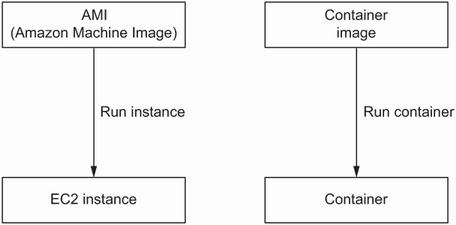
Figure 18.1 From a high-level view, virtual machines and containers are similar concepts.

Compare the high-level relationship between virtual machines and containers. section 18.1

How Amazon Web Services in Action, Third Edition: An in-depth guide to AWS covers it

How deep it goes
Defines the portability and immutability model but deliberately skips Docker image creation and container-starting fundamentals.
Examples
Uses a web server and an ALB–ECS–Fargate–S3 architecture as deployment examples.
What it assumes
Assumes basic knowledge of running software in containers, S3, and request distribution with an Application Load Balancer.
What you can do after
Apply containers to deploy workloads on AWS through App Runner, ECS, or Fargate.
How it connects
Connects containers with Docker, virtual machines, immutable servers, continuous deployment, ECS, Fargate, App Runner, ALB, and S3.

Also explained in

Compare how 27 books explain container →

Related concepts

This explainer was generated by Manning's knowledge graph from the text of Amazon Web Services in Action, Third Edition: An in-depth guide to AWS. The section links point to the parts of the book it draws on.

























