A container packages an application with its dependencies so it can run consistently across computing environments. A Docker image is the package; a container is a runnable instance of that image. section 3.2 section 3.2.3
A practical Docker workflow moves an application from local development toward deployment:
- Write the application and list its dependencies, then verify it runs locally. section 3.2.1
- Describe packaging instructions in a Dockerfile and build a tagged image. section 3.2.3
- Run the image, map a container port to a host port, and check that the service responds. section 3.2.3
- Push the tagged image to a container registry so a deployment environment can retrieve it. section 3.2.3
Figure 3.3 Process of building the Docker image from the local desktop and pushing it to the container registry, which is where a server retrieves the image and runs it as a container
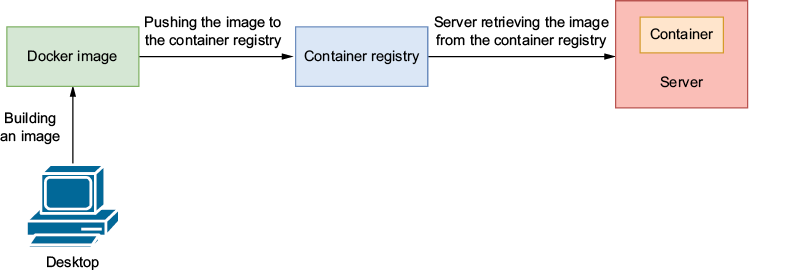
Follow the image from a local build to a registry, where a server retrieves it and runs it as a container. section 3.2.3


























