Need to run an application without installing its tools and libraries directly on every machine? Package it as a Docker image, then run that image as a container. The image holds the application content and instructions for starting it; the container is the running environment. section 2.1 section 2.3
A container gives its application a virtual hostname, IP address, and filesystem. Other containers have separate environments, even when they run on the same computer. They share that computer’s operating system, CPU, and memory, unlike virtual machines, which each need their own operating system. This balance of isolation and density makes it practical to run many applications on one machine. section 2.2
Figure 2.3 Multiple containers on one computer share the same OS, CPU, and memory.
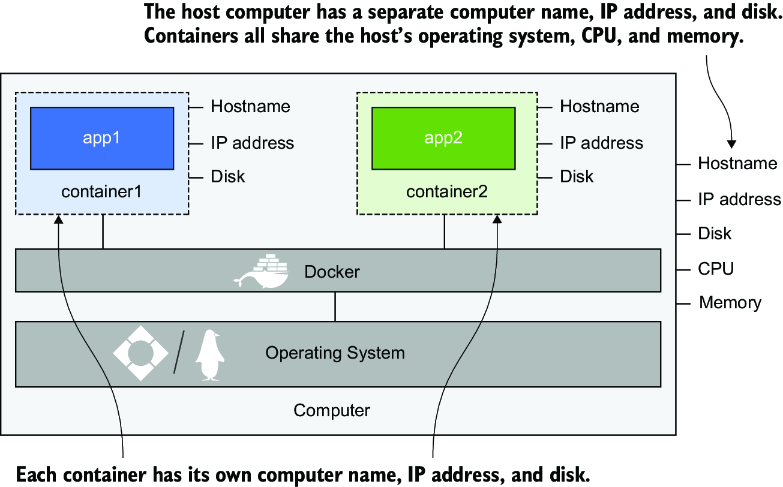
See how multiple isolated containers share one computer’s operating system and hardware resources. section 2.2
Run one, then look inside
Start Docker and run `docker run diamol/ch02-hello-diamol:2e`. If the image is not local, Docker downloads it before starting the container. The application prints a greeting and details such as its hostname and network address, then finishes. For a connected terminal, run `docker run --interactive --tty diamol/base:2e` and try `hostname` and `date` at the container prompt. From another terminal, `docker container ls` lists running containers; `docker container logs` and `docker container inspect` let you examine one by its ID. section 2.1 section 2.3
Containers can communicate over a virtual network without every service being exposed externally. A distributed application can place components in separate containers; a Dockerfile packages each component, while Docker Compose can describe the whole application. For data that must outlast a container, plan for Docker volumes or mounts rather than treating its filesystem as permanent storage. section 1.1.2 section 1.1.3 section 6.0
Check platform compatibility before choosing an image. A Linux container cannot simply run as a Windows container, and processor architecture matters too. Windows containers additionally require a compatible Windows OS version between image and host. Docker Desktop offers emulation or virtualization for some mixed-platform development setups, but production hosts still need the appropriate operating system. section 1.3 section 13.1
Containers are lightweight and disposable, but Docker does not automatically remove them or their images. Docker can run and network several containers on one machine; spreading them across machines for scale or high availability calls for a container-management platform such as Kubernetes or a cloud service. section 1.3 section 1.4.5
Try a small change
Run a website container and replace its `index.html` so your browser shows a different home page. The exercise makes the container’s own filesystem visible in a practical way; use `docker container --help` to discover available actions. section 2.6


























