A service may run perfectly on a developer’s machine yet fail for another team because a dependency is missing or its binary targets a different operating system. A container packages the application into a standardized environment that the other team can run locally and that a hosted service can run in production. The goal is less machine-specific setup, not a new way to write the application. section 1.3.6 section 7.0
Think of a shipping container: its standard form lets different carriers move its contents without repacking them. A software container similarly runs through a container runtime, such as Docker; Podman is another option. Containers are created from images—saved definitions of what should run. One image can start many containers, and the runtime works with the host operating system while sharing its kernel. section 7.0 section 7.1
Figure 7.2 Applications work with an operating system within the container, which interacts with the container runtime. The runtime then runs as a process within the host operating system like any other application.
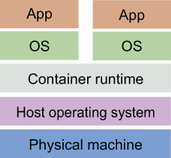
The diagram locates the application, container runtime, and host operating system in the running stack. section 7.1
Build once, run locally
For a Go API, install Docker as the runtime and use the Buildpacks pack tool to build an image: `pack build hello-api --builder gcr.io/buildpacks/builder:v1`. The builder recognizes the Go module and looks for a main package. Run the result with `docker run hello-api`, then call the API endpoint to check that it works in its portable package. A Dockerfile is another route when the build needs a custom definition. section 7.3 section 7.0
To share the result, publish the image to a container registry rather than asking each team to build it. Images can use layered bases, and a pipeline can build and publish an image after tests pass. A later pipeline job can deploy that image to Google Cloud Run and call an endpoint as a check. The same container can support local integration, while hosted runtimes handle deployment concerns that would otherwise require more infrastructure work. section 7.4 section 7.5
Listing 7.2 pipeline.yml
deploy-container:
    name: Deploy Container buildpack
    runs-on: ubuntu-latest
    needs: containerize-buildpack
    if: ${{ github.event_name == 'push' && github.ref == 'refs/heads/main' }}
    steps:
    - name: Deploy to CaaS
      id: deploy
      uses: google-github-actions/deploy-cloudrun@main
      with:
        service: translate                                              #1
        image: gcr.io/${{ secrets.GCP_PROJECT_ID }}/hello-api:latest    #2
        credentials: ${{ secrets.gcp_credentials }}
    - id: test                                                          #3
      run: curl "${{ steps.deploy.outputs.url }}/hello"
The pipeline listing shows a deployment job that waits for the container build, deploys its image, and checks the resulting service URL. section 7.5
Containers also provide external services for integration tests and temporary deployments for automated QA. Use them where portability and repeatable setup justify the cost: maintaining images brings upgrades, security patches, and build decisions. A simple function or shared platform may need no container work from the application team. section 9.6 section 7.8


























