A container is a way to run an application as an isolated set of processes rather than as a separate virtual machine. It shares the host kernel instead of bringing its own kernel and networking stack. In Linux terms, “container” is shorthand for process and resource isolation built from namespaces and control groups (cgroups): namespaces isolate processes and their resources, while cgroups limit and account for groups of processes. section 1.3
This separation decouples an application from a particular operating-system instance. Multiple instances of one server, or several applications that each listen on port 80, can run on one physical host without assigning every application its own VM. Containers therefore shift deployment attention toward the application and its runtime environment rather than a dedicated machine. section 1.3 section 8.9
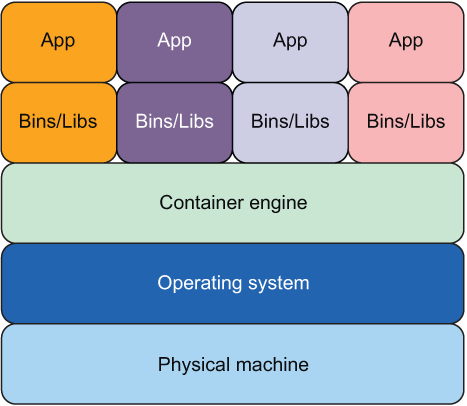
Compare this layout with VM-based deployment: applications run in containers instead of being tied one-for-one to operating-system instances. section 1.3
Docker makes containers practical to operate and portable to deploy. A developer can package application code with its dependencies, run that package locally, and hand the same container to an operations team. The operations concern becomes deploying the container rather than ensuring every target machine has a required library version. section 3.1
A Docker container is commonly managed through a small lifecycle:
- Create and run it with docker run, choosing a name, port mapping, and environment variables. section 3.1
- Use docker inspect to read details such as its process path, arguments, and State fields including running status, PID, exit code, and timestamps. section 3.1
- Stop it with docker stop; inspection then reports an exited state rather than running. section 3.1
- Perform equivalent create, start, and stop operations programmatically through Docker API methods ContainerCreate, ContainerStart, and ContainerStop. section 3.5
PostgreSQL development container
Run PostgreSQL in a container with port 5432 mapped to the local machine and POSTGRES_USER and POSTGRES_PASSWORD configured. A local psql client can then connect through that mapped port and create a table. Inspecting the container shows it running; after stopping it, the state shows exited. section 3.1
In an orchestrator, a container supplies the execution context for a task: CPU, memory, and networking are configured around the task’s needs. Tasks execute one-to-one as containers. Workers start or stop them, while managers, schedulers, and worker APIs hide physical or virtual infrastructure so users can focus on whether their application runs correctly in Docker. section 3.0 section 4.8 section 8.9
Containers are not virtual machines. A VM has its own kernel, networking stack, and resources; a container does not. Docker also avoids making an orchestrator directly responsible for the differing details of ordinary operating-system processes across Linux, Mac, and Windows. section 1.3 section 3.5


























