A container packages an application with its required binaries and libraries inside an isolated execution environment. Unlike a virtual machine, it runs on the host operating system, shares the host kernel, and starts with little boot overhead. section 12.1.2
Use containers to make application environments deterministic and lightweight:
- Define the binaries and libraries needed to build and run an application, keeping the environment separate from the host. section 12.1.2
- Run multiple workload instances while avoiding replication of a complete guest operating system for each instance. section 12.1.2
- Use a container manager on a physical server or virtual machine; the host operating system and hardware enforce isolation. section 12.1.2
Multistage container build for Go
A multistage Docker build separates compilation from runtime packaging: FROM golang:1.22 as build RUN useradd --create-home --shell /bin/bash appbuild RUN mkdir /home/appbuild/bin COPY * /home/appbuild WORKDIR /home/appbuild RUN go build -o /home/appbuild/bin/app /var/appbuild/main.go FROM ubuntu:mantic RUN useradd --create-home --shell /bin/bash apprun COPY --from=build /home/appbuild/bin/app /home/apprun CMD ["/home/apprun/app"] The final image receives the compiled executable from the build stage and runs it without carrying the build environment forward. section 12.1.2
Figure 12.2 Comparing containers to VMs
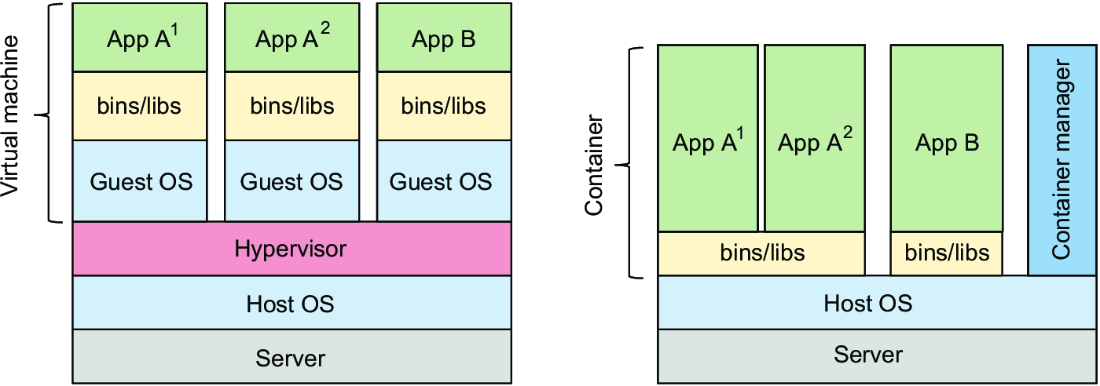
Compare the replicated guest operating systems of virtual machines with the shared-kernel model of containers. section 12.1.2


























