A container runs an application process in an isolated environment on a host operating system. Unlike a virtual machine, it does not run a separate operating system: its processes share the host kernel. This makes it practical to give each service its own environment without the overhead of a VM, though the isolation is not as strong. section 2.1.1
This is useful when services need different versions of a library or other dependencies. Docker packages an application and its environment as a container image. An image registry stores and shares that image; a container is a running instance created from it. The container gets its filesystem from the image, with other filesystems mountable when needed. section 1.1.3 section 2.1.2
Figure 2.4 The three main Docker concepts are images, registries, and containers.
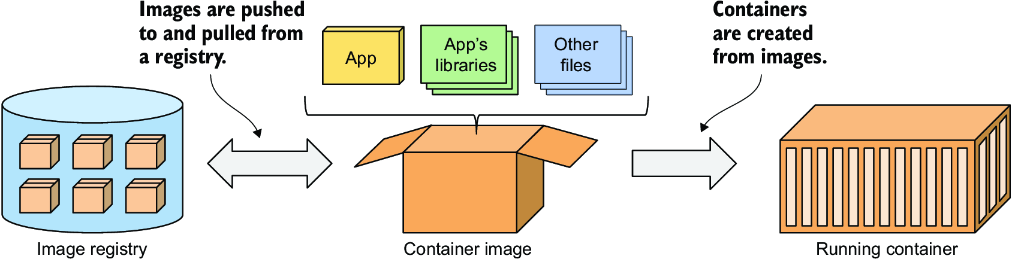
Use the image–registry–container diagram to distinguish the package, its distribution point, and the process that runs from it. section 2.1.2
Isolation changes what a process can see, not whether it is a host process. Linux namespaces give it a restricted view of resources such as process IDs, filesystems, network interfaces, and hostnames. From inside, it may appear to be alone; from the host, it remains a regular process. Resource limits help prevent one container from consuming resources needed by others. Because containers share a kernel, they are not fully isolated, and most should run without elevated privileges. section 2.3.1 section 2.3.2 section 2.3.4
Inspect a running container
Run `docker exec -it kiada-container sh` to start a shell alongside the application process, then run `ps aux`. The example shows `node app.js`, the shell, and `ps` inside the container; listing processes on the host also reveals the Node.js process. The shell must be present in the image—it may not be included in a production container. section 2.3.2
A container normally has one main process, apart from children it starts. This keeps logs attributable to that process and gives the runtime a clear signal for when the container has stopped. `docker stop kiada-container` signals the main process to shut down; `docker start kiada-container` resumes the stopped container. `docker rm kiada-container` deletes that container and its state, but leaves its image available. section 5.1.1 section 2.2.5
In Kubernetes, a pod—not a container—is the object used to run one or more co-located containers. A Deployment can specify an image as desired state, after which Kubernetes creates the application container in a pod. Put related processes in separate containers within one pod when they must run together; keep independently scalable parts in separate pods. Containers in a pod have separate image-based filesystems. Changes made there are lost when Kubernetes replaces a terminated container, so mount a volume when files must survive replacement. section 3.3.1 section 5.7 section 9.1
Listing 5.1 A basic pod manifest file
apiVersion: v1      #1
kind: Pod      #2
metadata:
  name: kiada     #3
spec:
  containers:
  - name: kiada      #4
    image: luksa/kiada:0.1     #5
    ports:
    - containerPort: 8080      #6
The basic Pod manifest shows where a container’s name, image, and application port belong in a Kubernetes definition. section 5.2.1


























