A training dataset is the pile of examples a model learns from. For image-model customization, it is usually images plus labels or captions: the visual evidence and the words that tell the trainer what each image represents. Fancy training settings cannot rescue a dataset that is confused, repetitive, or badly labeled. section 13.2 section 15.2
Start with a clear target. A custom subject LoRA can learn from 15–25 varied photos, while a broader fine-tuning job needs many more images to cover styles and topics. Favor high-quality images that show the subject in different poses and environments rather than a folder full of near-duplicates. section 15.2 section 13.6
Prepare the dataset before launching training:
- Collect images that directly represent the behavior, subject, style, or concepts you want the model to reproduce. section 15.1 section 13.6
- Add descriptive captions. Choose a trigger word that fits the subject without being easily confused with something already known by the model. section 13.6
- Keep image files and caption files paired when the trainer expects a text file per sample. section 15.3.4
- Inspect totals, caption coverage, image sizes, and caption lengths before training; a quick check can prevent spending time on broken data. section 15.3.4
A custom dog dataset
To train a Flux LoRA for a particular dog, assemble varied photos of that dog and caption them carefully. The variety makes it easier to tell whether the LoRA learned the individual subject rather than merely producing a generic dog-shaped approximation. section 13.0 section 13.6
Generating a monster dataset automatically
A larger fine-tuning dataset can be generated with AI: choose subjects such as crabs, beetles, mantises, and ants, combine them with target styles, have an LLM create prompts, and send those prompts to DALL-E 3. The resulting images arrive with prompt-derived labels, avoiding much of the manual collection and annotation work. section 15.2 section 15.2.2
Dataset limits also show up at generation time. Stable Diffusion trained around 512×512 images may behave oddly when asked to make much larger images, even if the GPU has enough VRAM; repeated or tiled subjects are one possible result. More pixels are not a magic “make it better” dial. section 7.1.2
Figure 15.14 The statistics window helps us quickly verify the quality of our training data.
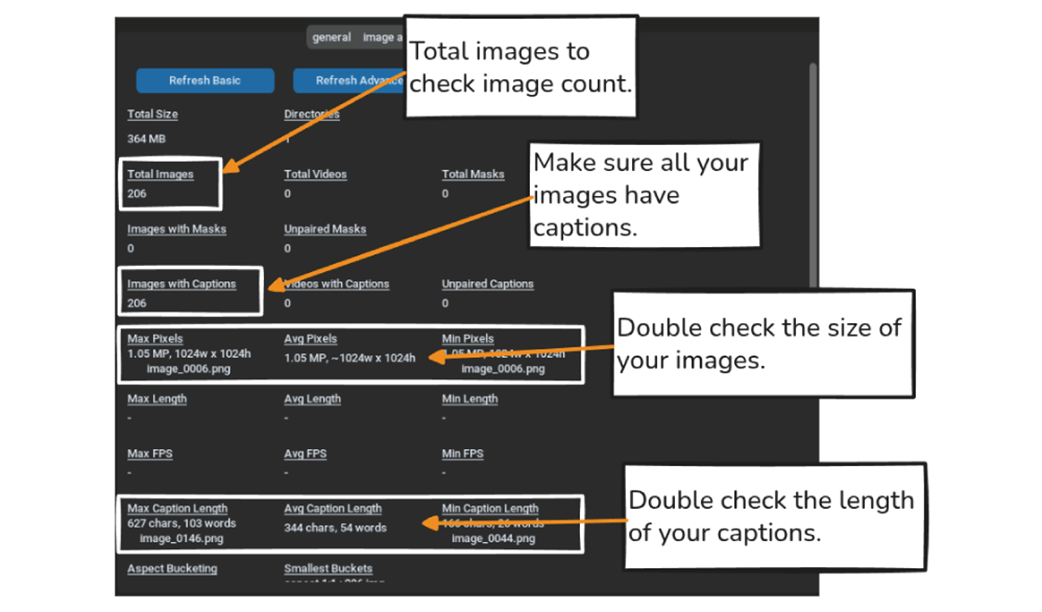
Use the statistics view as a preflight check: matching image and caption counts, plus plausible image and caption sizes, are useful signs that the dataset is ready to train. section 15.3.4