An AI agent is software that uses an AI model to pursue a task, make decisions, and take actions. Unlike a standalone language model that responds to a prompt with text, a tool-using agent can choose an action, call an external service, use its result, and continue toward a goal. Agents can work behind a chat interface or run in the background. section 6.4 section 1.2.1
A practical agent needs a goal, an AI model for reasoning, tools for actions, and a system prompt to guide behavior. In LangChain.js, an agent is a Runnable that can join other chains. A ReAct agent decides when to call a tool and incorporates the returned information into its answer. Its steps can be tracked, which helps make multistep behavior visible. section 6.4 section 6.4.2
To assemble a tool-using agent in LangChain.js:
- Choose the AI model and write the system prompt that defines the agent’s behavior. section 6.4.2
- Provide community tools or define a custom tool with `tool` from `@langchain/core/tools`. section 6.4.2
- Create the agent with `createReactAgent`, then integrate it into a chain or application. The example projects can be run with `node agents.openai.js` or `node agents.google.js` after configuring the corresponding API key. section 6.4.2
From question to action
For “What are the top three products in sales this month?”, a database-querying agent can retrieve sales data, identify the highest-selling products, and return the result. A search agent can instead call a search API to answer a question about recent developments. In both cases, the external result supplies information that a prompt alone would not retrieve. section 6.4
In a web app, keep the interface, backend, and agent responsibilities distinct. A chat interface sends a user message to the backend, which passes the query and context to an AI model, checks the response, and returns it for display. That flow supports conversation, but an agent adds decisions and tool use; calling every chat response an agent does not describe those extra capabilities. The backend also has a role in protecting privacy and keeping responses reliable. section 2.2.1 section 1.2.1 section 6.4
Figure 2.2 The user interaction flow in the chat application. The user types a question and presses Enter. The web UI submits the question to the backend service, which processes it and sends it along with context to the AI model. The AI model responds with a query response, which the backend service verifies and sends back to the web UI to update the conversation messages. This cycle allows for follow-up questions.
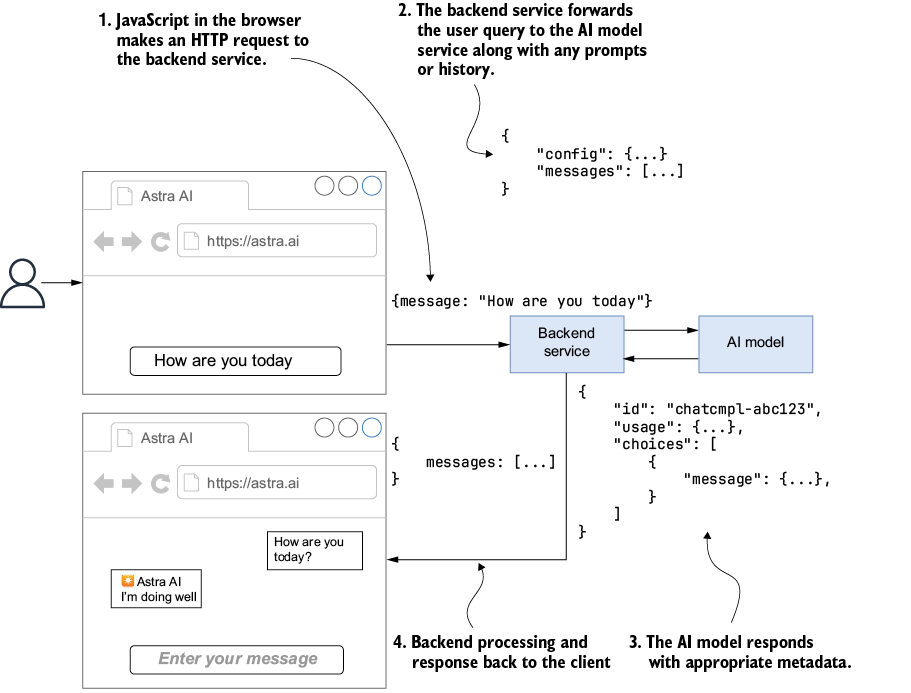
Trace a question from the chat UI through the backend and model, then back to the conversation; use it as the baseline flow before adding tool use. section 2.2.1
For reusable external capabilities, an agent can use a Model Context Protocol (MCP) client. The agent handles reasoning and decisions; the client communicates with MCP servers that expose tools and return results. This separation lets applications connect to multiple services without putting each tool’s integration into the assistant’s core logic. Because libraries and SDKs change quickly, revisit dependencies and APIs when running an example in a current project. section 12.2 section 12.0 section 11.3
































