An AI agent uses a language model to choose what to do next instead of following a fixed sequence of processing steps. This is useful when a data-analysis question might require a database query, information from text, or several tools used in an order that cannot be predicted beforehand. section 1.6 section 10.3
Give the agent a task and a set of tools. Each tool offers a function and a natural-language description that helps the model decide when to use it. The model selects a tool and its inputs, receives the result, and uses that result to decide whether to take another step or give a final answer. section 10.3
Figure 10.2 Using language models as agents. Given a prompt describing the task and available tools, the language model decides on termination and tool invocations. Results of tool invocations are added to the prompt used for the next iteration.
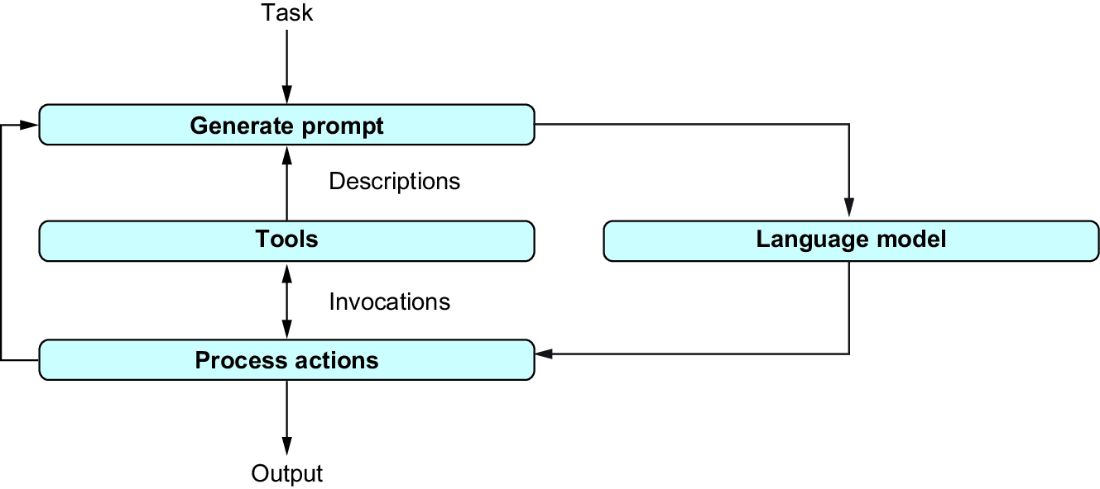
Follow how a task and available tools lead to a tool call, then how its result feeds the next decision. section 10.3
For a database-and-web agent, the available tools can include:
- Database tools to list tables, inspect a table’s schema, check an SQL query, and run it. section 10.4.1
- A web-search tool to retrieve information that relates to a database result. section 10.4.1
Find a game, then look it up
Ask, “What was the most sold game in 2016, and how is it played?” The agent lists database tables, inspects the games table, checks and runs an SQL query to find the title, then can use that title to search the web for how the game is played. Its next action depends on what earlier tools return. section 10.4 section 10.4.4
To build this example with LangChain, create a ChatOpenAI model and an SQLDatabase for an SQLite file, load the SerpAPI search tool, and pass them to create_sql_agent as the model, database, and extra tools. Call agent.invoke({'input': task}) with the question. Web search requires a SerpAPI access key; verbose output shows the tool calls. The result is an answer, or a failure message if the agent cannot find one. section 10.4.2 section 10.4.3 section 10.4.4
Tools need not be limited to database access and search. A currency-conversion tool, for example, lets an agent query game revenue in US dollars and then convert the result to yen. section 10.5.2 section 10.8
































