An AI agent is a program that lets an LLM direct part of its own execution. Given a goal and the current context, the model decides what to do next, which tool to use, and when to stop. Unlike a fixed workflow, its sequence of actions need not be specified in advance. section 1.2.2 section 1.3
A basic agent needs three parts:
- An LLM to assess the situation and choose the next action. section 1.2.2
- Tools to reach outside text generation, such as web search, code execution, or database queries. section 1.3.2
- A loop to run a chosen action, observe its result, and reconsider until the task is complete. section 1.3.2
Figure 1.3 The LLM agent’s decision loop is an iterative process of LLM decision-making and tool use.
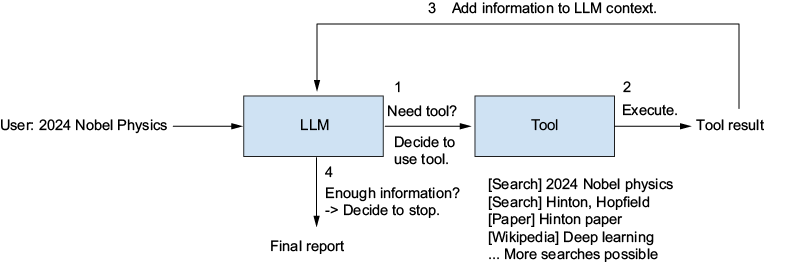
The decision-loop diagram shows why one tool call is not necessarily the end of a task: its result becomes context for the next decision. section 1.2.2
Research with an uncertain path
Asked to report on the 2024 Nobel Physics Prize winners’ research, a research agent can search for the winners, inspect further sources, and synthesize a report. The consequential decisions—which source to check next, whether the evidence is sufficient, and when to write—are made during execution rather than hardcoded. A question combining marathon pace and Earth–Moon distance similarly requires searching, gathering values, and calculating an answer. section 1.2.2 section 1.4.2
Use an agent when the task needs an LLM and its steps are difficult to predict. Prefer a single call or a developer-defined workflow when that is sufficient: repeated model calls add cost and latency, while early errors can propagate. A practical compromise is to place an agent inside one flexible stage of a workflow, then use later stages to check its output or handle failure. section 1.4 section 1.4.2 section 1.3.3
A minimal Python interface configures a model, tools, and instructions, then calls `agent.run(question)`. Implementing what sits behind that call means managing state and model communication, executing tools, returning observations to the model, handling errors, and producing a final answer. System prompts set persistent permissions, constraints, and tool-use policies; the surrounding harness also includes tools, memory, and the environment the agent can reach. section 4.2.1 section 4.0 section 2.3 section 1.5.5
Test the whole run, not just the final model call. GAIA supplies multistep questions with checkable answers for an observe–analyze–improve cycle. An evaluation run can retain both structured output and the full execution context, making failed tool choices or missing information easier to investigate. section 1.4.3 section 4.8.1 section 1.0
































