An AI agent is an LLM that receives a goal, decides its next step, uses tools, observes the result, and repeats until it reaches the goal. It can read and write files, run commands, follow imports, and interpret outputs without receiving a file list for every move. section 2.5.2 section 4.0
The useful mental model is focused autonomy, not unlimited codebase understanding. Agents spend one shared context window on files, tool output, and reasoning, so they cover many files but lose depth as they wander. They work best on narrow questions that require tracing across files, especially after a workflow has produced a map. section 2.5.2 section 4.0 section 2.5.3
Use an agent when the task requires decisions and concrete interaction with a repository:
- Trace a behavior that no single file explains, such as following a file click from the Explorer through editor services, model creation, and disk access. section 4.2
- Run tests or builds to replace guesses with observed behavior, then diagnose failures by reading repository configuration and retrying. section 4.4
- Create durable artifacts such as CODEBASE.md or a skill file so later sessions begin with accumulated understanding. section 2.5.2 section 4.0
- Avoid broad prompts that ask for an entire architecture in one pass; they often produce class names and type signatures rather than purpose and relationships. section 4.1
Tracing a file opening
Ask: “What happens when a user clicks a file in the VS Code Explorer? Trace from the click to the text appearing in the editor. Show me every file involved.” The agent searches for ExplorerView, follows openEditor, distinguishes common interfaces from browser implementations, traces editor and file-loading layers, and reaches model attachment in the code editor. section 4.2
Recovering a failed build
A request to build and launch VS Code lets the agent treat an environment failure as evidence. After npm install fails with a native-module error, it reads .nvmrc, notices Node 24.3.0 is incompatible with the required 22.22.1, switches versions, retries successfully, compiles, and launches the editor. section 4.4
Figure 4.1 The agent traces, tests, and runs code to learn the codebase, saving what it learns in a skill file so the next session can build on that knowledge instead of starting from scratch.
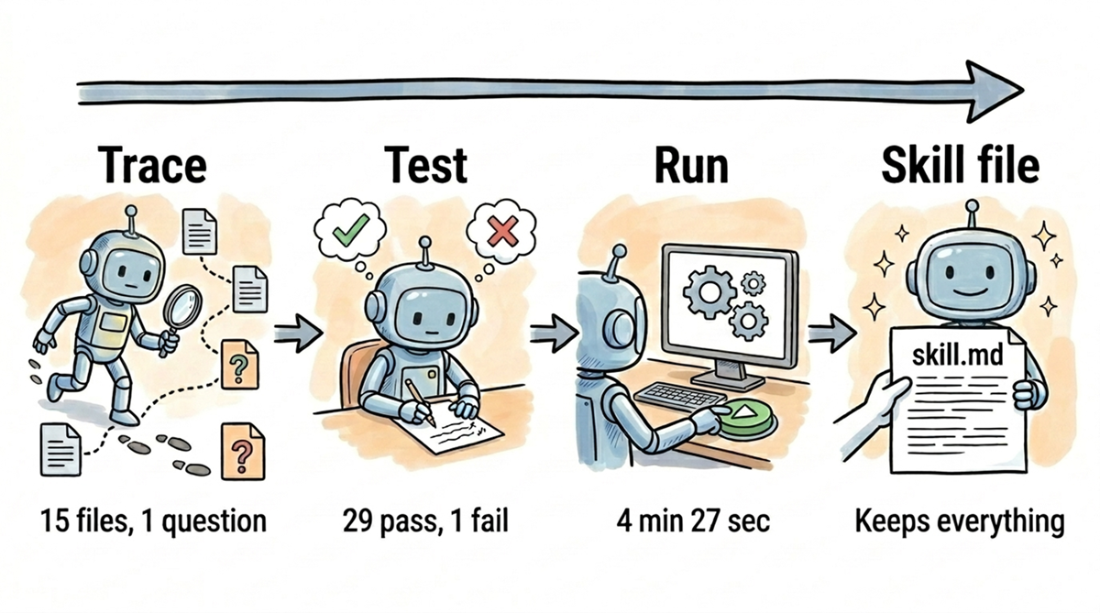
Shows the agent learning through traces, tests, and code execution, then saving its findings for the next session. section 4.0