Generative artificial intelligence creates new content from learned patterns: text, source code, documentation, tests, images, music, and more. For software work, it acts as a context-aware assistant that can suggest implementation details while the developer retains responsibility for architecture, design, and acceptance. section 1.7.1 section 1.0
Coding tools commonly rely on large language models (LLMs), trained on large text and code datasets to predict likely continuations. They do not retrieve guaranteed facts or produce certain answers; they generate statistically likely responses based on a prompt, surrounding context, and learned patterns. section 1.4 section 1.5
Figure 1.1 Integrated tools use a sophisticated system to generate code. The process starts with your prompt, and the assistant gathers up documentation and source code to see whether your answer can come from these sources. It makes a best guess at what you’re looking for and generates a response. Your acceptance of these responses helps train the assistant in the future (unless you’ve blocked feedback).
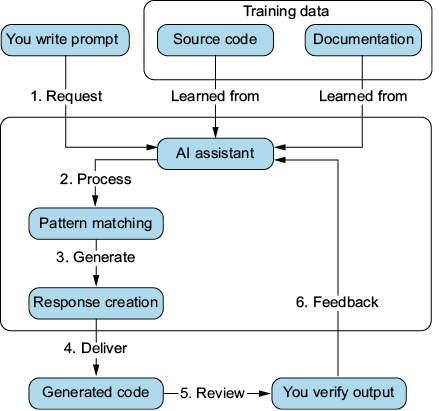
An integrated assistant starts with a prompt, gathers available documentation and source context, makes a best-guess response, and may use accepted responses as feedback when that is enabled. section 1.3
Use generative AI across an AI-assisted development workflow:
- Generate code completions, functions, scaffolding, stubs, and boilerplate so attention can move to harder design and problem-solving work. section 1.7.2 section 5.0
- Analyze code for potential bugs, security vulnerabilities, and performance problems, then review suggested fixes against the actual application context. section 1.1.2
- Draft structured, contextually relevant documentation and use explanations to understand unfamiliar or existing code. section 1.1.3
- Create test cases, mock data, repetitive setup, and possible edge cases for stronger test suites. section 1.1.5 section 8.0
- Support ideation, planning, coding, testing, and documentation rather than only typing code. section 1.12
Integrated tools work inside an IDE and can use code context while suggestions are written. Standalone tools usually provide a web-based conversational interface and are useful for broader requests such as software outlines, abstraction, and design. Examples include GitHub Copilot, Tabnine, and Blackbox AI for integrated assistance, and ChatGPT and Gemini for standalone interaction. section 1.2.1 section 1.2.2
Build a first application version with AI assistance
For a Flask-based HAM radio practice-exam application, ask a conversational tool to extract requirements, propose a file structure, and generate classes or stubs; use an IDE assistant to create a starting point. Then connect and run the stubs, refine the architecture, add needed code, and reject or revise suggestions that do not fit the design. section 4.0 section 4.7 section 5.0
Treat output as a proposal, not an authority. Models can sound confident while producing incorrect code or information because likely-looking sequences are not necessarily true. Provide clear context and direction, test generated code, validate documentation and answers, refactor when necessary, and keep human judgment in charge of meaningful results. section 1.5 section 1.12 section 5.0