Monitoring means checking a system’s logs and metrics to understand what it is doing, find errors, and spot capacity or performance problems. A log is an ordered record of messages generated by software or infrastructure. Metrics measure conditions such as CPU use, network traffic, and available storage. Together, they help you debug problems and decide when infrastructure needs attention. section 3.2 section 3.2.2
For an EC2 virtual machine, start in the AWS Management Console:
- To investigate startup errors, open EC2 > Instances, select the instance, then choose Actions > Monitor and Troubleshoot > Get System Log. Read the startup messages for errors. This works without an SSH connection, but new messages can take several minutes to appear. section 3.2.1
- To check load, select the instance’s Monitoring tab and inspect its CPU, network, and disk metrics. Basic monitoring updates every five minutes; detailed monitoring updates every minute and costs extra. Memory use is not included by default, though you can publish that metric yourself. section 3.2.2
Checking a website health check
A Lambda function’s Monitor tab shows its invocation count. Select View Logs in CloudWatch, then Search Log Group to search messages across its log streams. A success message can confirm that the health check ran and passed. Lambda sends logs to CloudWatch by default; Python functions can add messages with print or the logging module. If a message is missing, wait a few minutes and reload. section 6.2.2
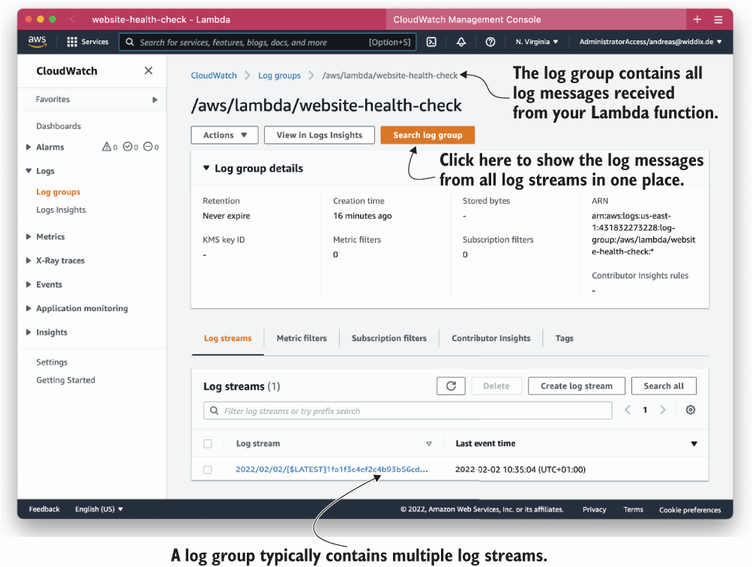
The diagram shows how one CloudWatch log group collects a Lambda function’s messages from multiple log streams. section 6.2.2
Managed services still need monitoring. An RDS database publishes metrics to CloudWatch; watch available storage and performance, and set alarms when important metrics cross thresholds. For a cache, useful signals include CPU use, swap use, evictions, and, for a Redis read replica, replication lag. Monitoring also belongs after a deployment: inspect the running system and its logs to check that the change succeeded. section 10.1.1 section 10.7 section 11.5 section 4.1







































