Monitoring tracks Airflow’s operational behavior so production problems become visible. Logs provide textual evidence from the API server, scheduler, and individual task instances; metrics add numerical measurements of system status. section 15.6 section 15.7
Use the four basic signals across tasks, DAGs, and Airflow components:
- Latency: measure response duration, such as web-server response time or the delay from queued to running. section 15.7.5
- Load: measure demand, such as tasks processed or available pool slots over time. section 15.7.5
- Errors: count failures such as zombie tasks, non-200 web responses, and timed-out tasks. section 15.7.5
- Saturation: compare resource or task usage with system capacity, including CPU load and running tasks. section 15.7.5
By default, Airflow writes logs under $AIRFLOW_HOME/logs. API-server access and error output normally goes to stdout or stderr, while scheduler output is written to files, including per-DAG processing logs and an aggregated manager log. The scheduler manager log rotates automatically at 100 MB. section 15.6 section 15.6.1 section 15.6.2
Preserving API-server output
Start the API server with a Gunicorn logging configuration file: airflow api-server --log_config [filename]. Configure accesslog and errorlog paths in that file to preserve both request activity and errors after shutdown. section 15.6.1
Figure 15.9 An example visualization of the number of running tasks. Here, parallelism had the default value 32, to which the number of tasks sometimes spikes.
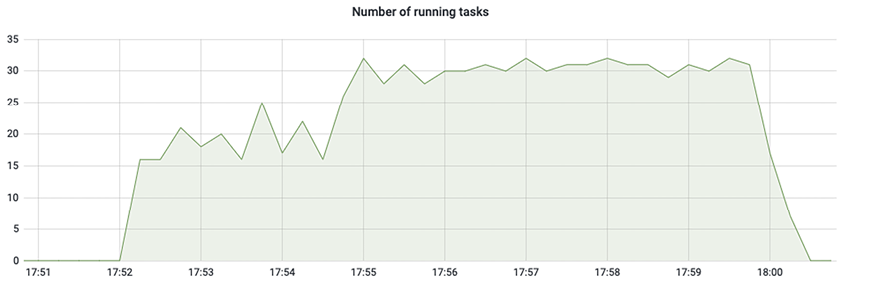
Use the running-task visualization to inspect workload spikes and compare activity with Airflow’s parallelism limit. section 15.7







































