Monitoring records events and diagnostic information so teams can investigate infrastructure problems and help users correct Terraform configuration. Backend access logs reveal who accessed state, while provider logs explain what Terraform is doing during execution. section 6.4.2 section 12.3.2
Apply monitoring differently at the backend and provider layers:
- Enable logging for every access to remote state so operational problems can be traced. section 6.4.2
- Use the Terraform Plugin Framework's tflog package rather than Go's log package; its levels map to Terraform's TF_LOG output and support filtering. section 12.3.2
- Pair logs with Diagnostics: collect multiple actionable errors instead of stopping at the first failure. section 12.3.2
- Avoid fatal exits in providers, which can suppress errors and leave Terraform state corrupted. section 12.3.2
Provider configuration diagnostics
A provider Configure function can call tflog.Debug at entry, append configuration diagnostics, add an attribute-specific error when an access token is unknown, emit an immediate log for a stopping problem, and return without using a fatal logger. section 12.3.2
Figure 6.1 Basic backend configuration requirements
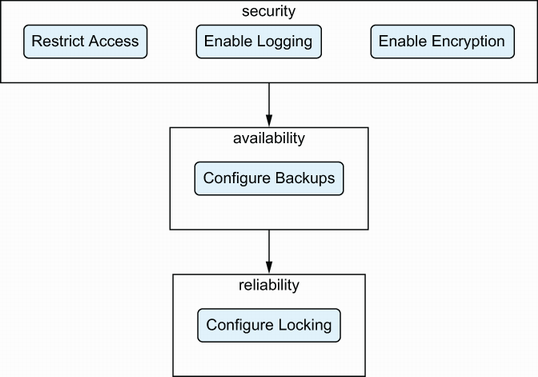
Use the backend requirements overview to relate logging to access restriction, backups, encryption, and state locking. section 6.4.2
Listing 12.4 Logging and error messaging
func (p *MastodonProvider) Configure(ctx context.Context, req
provider.ConfigureRequest, resp *provider.ConfigureResponse) {
    var data MastodonProviderModel
    tflog.Debug(ctx, "mastodon_provider configure")                      #1
    resp.Diagnostics.Append(req.Config.Get(ctx, &data)...)

    if data.AccessToken.IsUnknown() {
        resp.Diagnostics.AddAttributeError(                              #2
            path.Root("user-access-token"),
            "Unknown Mastodon User Password",
            "The provider cannot create the Mastodon API client as there
is an unknown configuration value for the Mastodon User Password. "+
                "Either target apply the source of the value first, set
the value statically in the configuration, or use the
MASTODON_USER_PASSWORD environment variable.",
        )
    }
    access_token := os.Getenv("MASTODON_ACCESS_TOKEN")
    if !data.AccessToken.IsNull() {
        access_token = data.AccessToken.ValueString()
    }

    // Repeat for user_email and user_password

    if access_token != "" {
        ctx = tflog.SetField(ctx, "mastodon_access_token", access_token) #3
        ctx = tflog.MaskFieldValuesWithFieldKeys(ctx,
"mastodon_access_token")                                               #4
    } else if user_email != "" && user_password != "" {
        ctx = tflog.SetField(ctx, "mastodon_user_email", user_email)
        ctx = tflog.SetField(ctx, "mastodon_user_password", user_password)
        ctx = tflog.MaskFieldValuesWithFieldKeys(ctx,
"mastodon_user_password")
    } else {
        resp.Diagnostics.AddAttributeError(                              #5
            path.Root("user-access-token"),
            "Missing Mastodon Credentials",
            "The provider cannot create the Mastodon API client as neither
the Access Token or the Username and Password fields are set.",
        )
    }

    if resp.Diagnostics.HasError() {                                     #6
        return
    }

    // Continue to configure client
}
#1 The logging lines help to understand what’s happening in the provider, but aren’t displayed by default.
#2 We can provide errors about attributes to the Diagnostics object, which will be displayed to the user.
#3 We can log the access token to help with debugging.
#4 We can also make sure to filter out the value from the logs.
#5 We can provide more than one error on the same flow.
#6 Before moving on we can check for errors and return early.
Use the provider listing to inspect how Terraform-specific logs and user-facing diagnostics work together. section 12.3.2







































