A container platform can restart unhealthy applications and scale them for traffic, but it cannot tell you whether users are getting a good experience. Monitoring gives you ongoing insight into what an application is doing and how well it performs, so people can investigate and respond when something goes wrong. It is a practical requirement before moving from a proof of concept to production. section 9.0 section 9.5
A containerized setup exposes application metrics, has Prometheus collect them, and uses Grafana to display them in dashboards. Start with a summary dashboard containing the most important data points: it should make trouble visible at a glance. Add infrastructure dashboards for disk, CPU, memory, and network capacity, and component dashboards for details such as page or API response times. section 9.0 section 9.5
Figure 9.14 The architecture of monitoring in a containerized application with Prometheus at the center
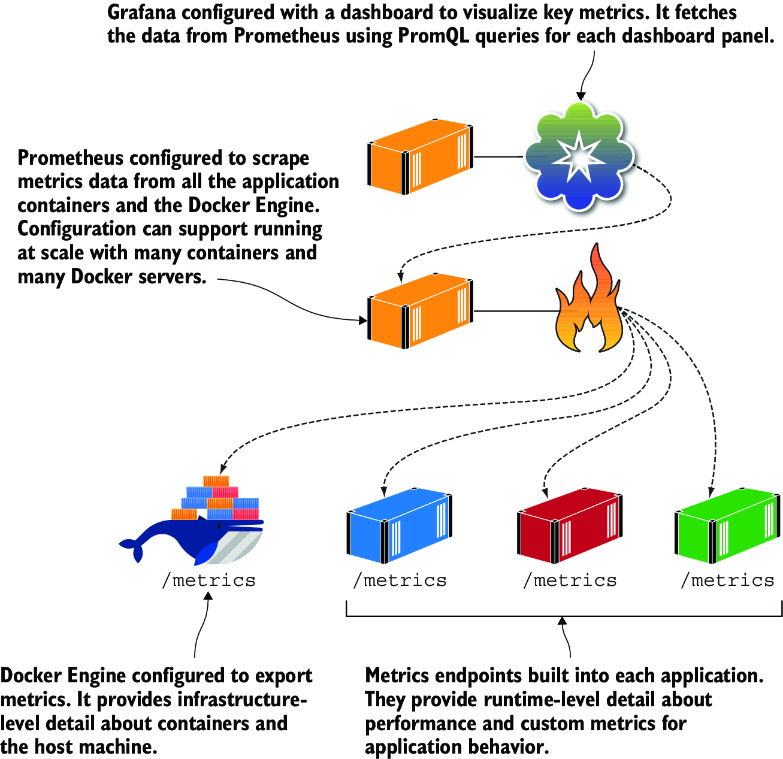
Use the architecture diagram to trace how application metrics reach Prometheus and become available for dashboards. section 9.5
Build a small monitoring stack
Run the metrics-enabled to-do list container, add a few tasks, and visit its /metrics URL. Then use Docker Compose to run the app alongside configured Prometheus and Grafana containers. Have Prometheus scrape the app and make a Grafana dashboard for tasks created, total HTTP requests, and requests currently being processed. Interact with the app again and check the dashboard. section 9.6
Metrics are not the only useful evidence. For container logs, make the application write to stdout or stderr so Docker can collect its output. An app that writes only to a file will leave Docker’s container logs empty unless a relay copies those entries to stdout. Centralized logging can then collect, filter, and search records alongside the metrics-based view. Keep the summary dashboard easy to scan, and use logs and more detailed dashboards when it points to a problem. section 19.1 section 19.2 section 19.5 section 9.5







































