Logging records runtime events and diagnostic information so developers can reconstruct what an application did, investigate strange behavior, and identify security breaches. Messages may describe routine execution, warnings, errors, or security events; their value depends on the information they contain. section 4.0
Read logs early when investigating a problem. They can provide the first useful clue when a debugger cannot inspect a crashed application, slow execution, frozen threads, time-sensitive behavior, or multithreaded behavior that changes under debugging. section 2.3 section 4.0
Implement logging deliberately:
- Classify messages by severity: error for critical issues, warn for handled potential errors, info for common execution events, and debug for fine-grained details. section 4.2.2
- Enable debug output only when normal information is insufficient; excessive messages make investigations harder and increase storage and execution costs. section 4.2.2 section 4.2.3
- Format each message with the event description, timestamp, severity, and writing location so investigators can interpret it quickly. section 4.0
- Separate message selection, storage, and formatting: loggers choose messages, appenders store them, and formatters shape their output. section 4.2.2
- Avoid secrets, private keys, passwords, and personal details; logs may persist in databases and expose data to people with infrastructure access. section 4.2.3 section 4.3
- Check deployment-specific destinations and configurations before adding messages, especially inside loops or when logs travel over a slow network. section 4.2.3
Tracing an unexpected method call
When a remote application calls an unfamiliar method, insert `new Exception().printStackTrace();` without throwing the exception. The resulting trace reveals the execution path—for example, `extractDigits()` called by `Decoder.decode()`, which was called by `Main.main()`—without changing the executed logic. section 4.1.2
Inspecting JVM garbage collection
Enable GC logging with `-Xlog:gc*`, or run `java -Xlog:gc* -jar app.jar`, when investigating excessive pauses, high CPU usage, or memory problems. Inspect initialization settings, collection phases, pauses, and heap-region changes. section 11.1
Figure 4.3 The anatomy of a well-formatted log message. In addition to describing a situation or an event, a log message should also contain several other relevant details: the timestamp of when the app logged the message, the event’s severity, and where the message was written. Reviewing the log details makes problem investigation much easier.
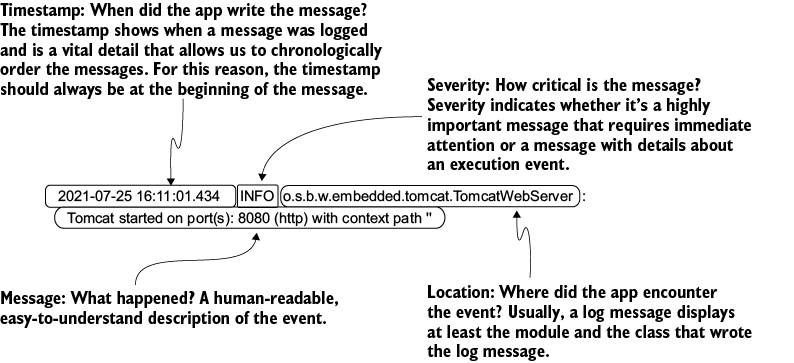
Use the formatted-message anatomy to inspect timestamps, severity, and source location while reconstructing application behavior. section 4.0







































