Monitoring self-hosted runners makes availability, utilization, capacity, and scaling behavior visible. Use it to determine whether enough runners exist for users, identify who consumes them, and guide repositories toward more efficient use. GitHub’s built-in views and APIs mainly expose runner availability, busy state, and labels, so uptime and utilization require a separate solution. section 7.0 section 6.5.3 section 7.6
Monitor signals that support operational decisions:
- Track available and busy runners, including counts for required labels; alert when availability falls below an expected level. section 6.5.3 section 7.2.2
- Track queued jobs, running jobs, percentage busy, and scale-out actions to judge whether scaling reacts quickly enough to bursts. section 7.2.1
- Track CPU, RAM, disk I/O, network I/O, and step duration to match runner size to workload demand. section 7.3
- Track outgoing network connections before enforcing an allow list; segment runners and runner groups by required network access. section 7.4.1
Capacity monitoring for a job burst
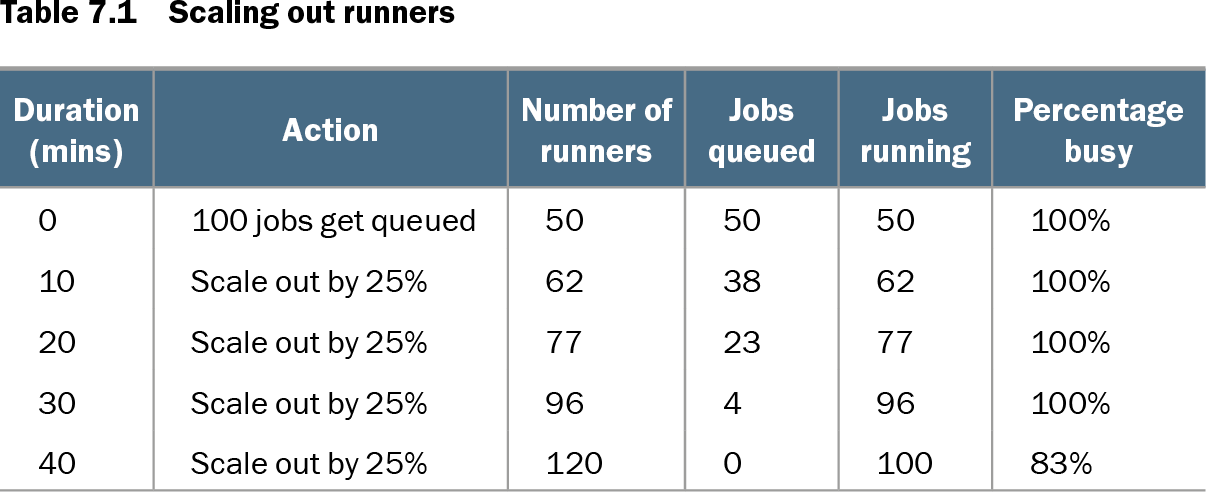
A pool of 50 runners at 100% utilization receives 100 hour-long jobs. Scaling by 25% every 10 minutes leaves queued work until the pool reaches 120 runners after 40 minutes. Monitor queue depth, busy percentage, and spin-up time to choose faster webhook-driven ephemeral scaling, a standby pool, scheduled scaling, or combined ARC rules. section 7.2.1
A scheduled GitHub Actions workflow can periodically load available-runner counts per label and notify Slack or Microsoft Teams when a threshold is missed. It provides useful baseline insight, but scheduling and event delays make it unsuitable for real-time scaling decisions. section 7.2.2
For deeper utilization data, install monitoring agents that report to a central server and attach runner, repository, and workflow fields for correlation. Alternatively, workflow telemetry can chart step duration and resource use in job summaries. Avoid oversizing: a brief lint job may not justify a large runner, while sustained near-90% utilization can justify testing a larger one. section 7.3
Table 7.1 Scaling out runners (view table figure)
| Duration (mins) |
Action |
Number of runners |
Jobs queued |
Jobs running |
Percentage busy |
|---|---|---|---|---|---|
| 0 |
100 jobs get queued |
50 |
50 |
50 |
100% |
| 10 |
Scale out by 25% |
62 |
38 |
62 |
100% |
| 20 |
Scale out by 25% |
77 |
23 |
77 |
100% |
| 30 |
Scale out by 25% |
96 |
4 |
96 |
100% |
| 40 |
Scale out by 25% |
120 |
0 |
100 |
83% |
Use the scaling timeline to compare queued work, running jobs, runner count, and utilization as incremental scale-out responds to a burst. section 7.2.1
Network monitoring is also a security control. An egress-monitoring agent can first audit job connections, then enforce an allow list. The illustrated harden-runner setup requires Linux sudo access, lacks macOS, Windows, and container-job support, and has paid private-repository and ARC capabilities. section 7.4.1