A prompt is a natural-language description of the image you want a generative model to make. In Stable Diffusion, it is the main text input: type a description, click Generate, and inspect the image that comes back. Think of it less as giving an imaginative artist a vague mood and more as searching a huge collection of possible images with useful terms. section 1.2.1 section 4.2 section 1.3.1
Start simple, then make the description clear and descriptive. “A damn fine cup of coffee, black as midnight on a moonless night” produced uneven results, while “A cup of black coffee” better communicated the desired subject. Add context for the object and describe a style when those details matter. Poetic language can be fun; it is not a reliable substitute for saying what you want. section 1.3.1 section 1.4
Use prompts as an iterative control rather than a one-shot incantation:
- Generate many variations and keep the result you like; a slightly odd handle is cheaper to replace than to argue with. section 1.2.1
- Adjust terms during img2img or upscaling for subtle tweaks—or dramatic changes when the new description differs greatly. section 7.3.4
- Borrow and test wording from model-page examples, because checkpoints can respond differently to particular keywords and phrases. section 5.2.2
- Keep the prompt alongside settings such as checkpoint, seed, sampler, dimensions, and CFG scale when you need a repeatable starting point. section 7.1.3
From coffee mood to coffee subject
Enter “A damn fine cup of coffee” in A1111 and generate a batch. If the images drift toward lattes or malformed cups, replace the flourish with “A cup of black coffee.” Compare the batches, then add only the missing details needed for the next attempt. section 1.2.1 section 1.3.1
Node-based workflows turn prompts into explicit conditioning inputs. In ComfyUI, a CLIP Text Encode (Prompt) node receives a CLIP encoder from the loaded checkpoint and supplies conditioning to the sampler. Build separate positive and negative prompt nodes: the negative one may be empty, but it still must be connected when the sampler requires it. section 8.2.3
Figure 8.11 Connecting our positive and negative prompts.
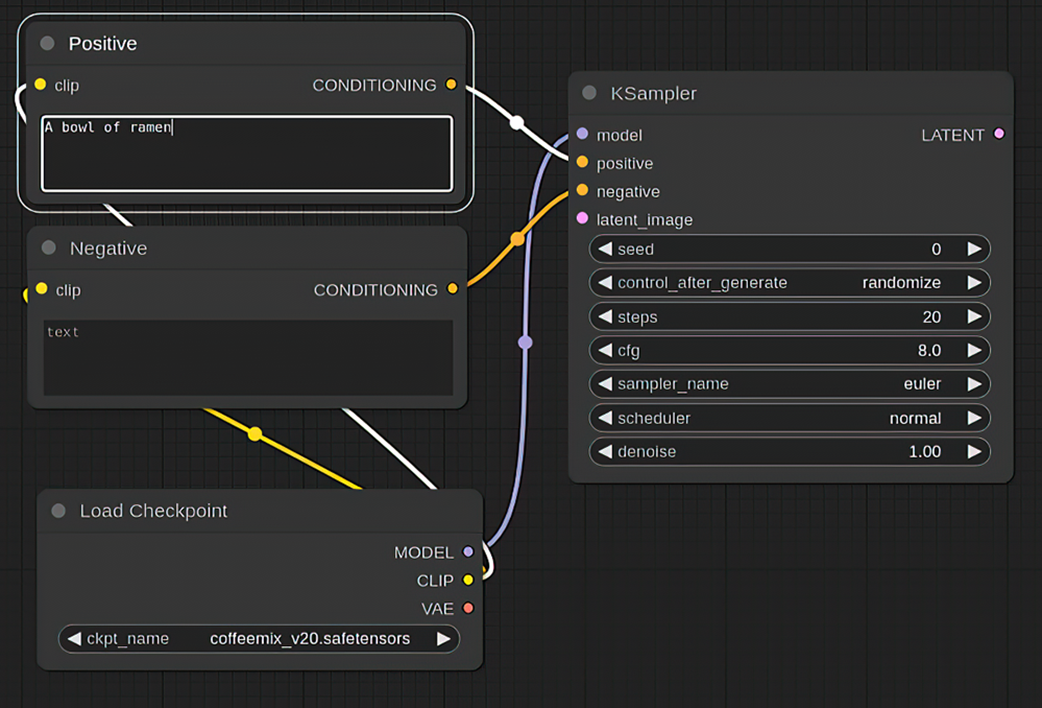
Use the workflow view to see how positive and negative prompt nodes connect from the checkpoint’s CLIP output to KSampler inputs. section 8.2.3