A workflow is a repeatable script-driven pipeline: it calls an LLM with predefined questions, processes inputs systematically, and produces consistent outputs. Unlike chat, which makes you drive every step, a workflow runs the same process across a repository. section 2.5.1 section 2.5
Build a codebase workflow by separating breadth from depth:
- Select the repository inputs; remove tests, documentation, and vendored code, or use a preliminary call to choose the most important files. section 3.6
- Run a fixed overview pass to identify entry points, core abstractions, and relationships. section 3.6
- Run separate zoom-in calls for each component instead of asking one prompt to handle breadth and depth simultaneously. section 3.6
- Require structured artifacts such as tutorials, relationship diagrams, cross-references, and learning paths. section 3.6
- Feed earlier outputs into later prompts so independent calls form a coherent narrative rather than disconnected summaries. section 3.6
Summarizing every Python file
A small Python loop reads each .py file, sends it to an LLM with the same question—"What does this file do?"—and prints a labeled paragraph. The script turns manual file-by-file exploration into a repeatable repository scan, while later passes can analyze connections that per-file summaries miss. section 2.5.1
Table 2.3 Chat, workflow, and agent: different ways to interact with your codebase.
|
|
Chat (this
chapter)
|
Workflow
(Ch 3)
|
Agent (Ch
4)
|
|
How it works
|
You paste,
you ask
|
Your script
loops
|
The LLM
reads, decides, and acts
|
|
Best for
|
Exploration,
follow-ups
|
Systematic
scan of new repos
|
Deep dives,
tracing, editing
|
|
Weakness
|
You drive
everything manually
|
Blind to
surprises
|
Burns
tokens wandering
|
|
Cost
|
Free or
~$20/mo
|
Pennies per file via API
|
~$20/mo or
pay per task
|
Compare chat, workflow, and agent by control, coverage, weakness, and cost before choosing the interaction pattern. section 2.5
Figure 3.3 An agent's cost snowballs because it re-sends a growing context with each call; a workflow makes a handful of bounded calls with fresh contexts, keeping the VS Code tutorial's total cost around $2.
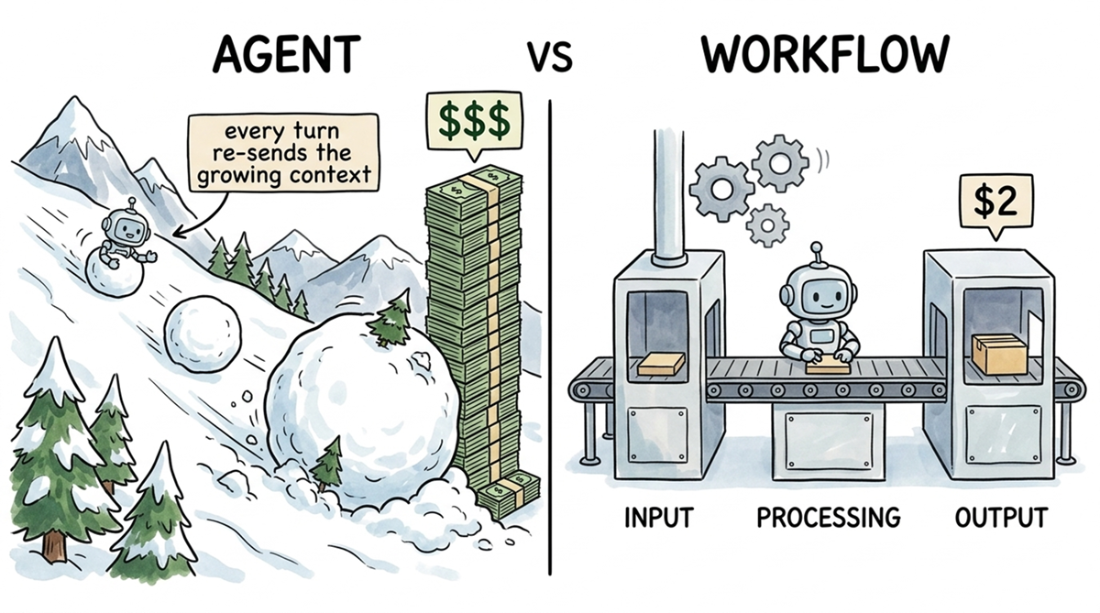
See why bounded workflow calls keep cost predictable while an agent's shared context and repeated actions can make cost grow. section 3.1