Artificial intelligence (AI) uses computing systems to support capabilities associated with human intelligence. In software troubleshooting, AI tools help developers generate starting points, diagnose problems faster, automate repetitive work, and investigate complex Java application behavior. section 1.3
Use AI during troubleshooting to:
- Describe an observed problem in a prompt and ask for possible starting points. section 1.3
- Accelerate understanding of unfamiliar capabilities or runtime behavior without treating the tool as a replacement for investigation. section 1.3
- Combine AI suggestions with diagnostic evidence such as thread states and stack traces. section 1.3
Starting with a problem prompt
When a Java application behaves unexpectedly, describe the symptom and context to ChatGPT or a similar tool. Use the response to identify investigation paths, then verify them against runtime observations rather than accepting a single suggested cause. section 1.3
Figure 1.11 A thread dump provides details about the threads that were running when the dump was taken. It includes thread states and stack traces, which tell you what the threads were executing or what blocked them. These details are valuable for investigating why an app is stuck or is having performance problems.
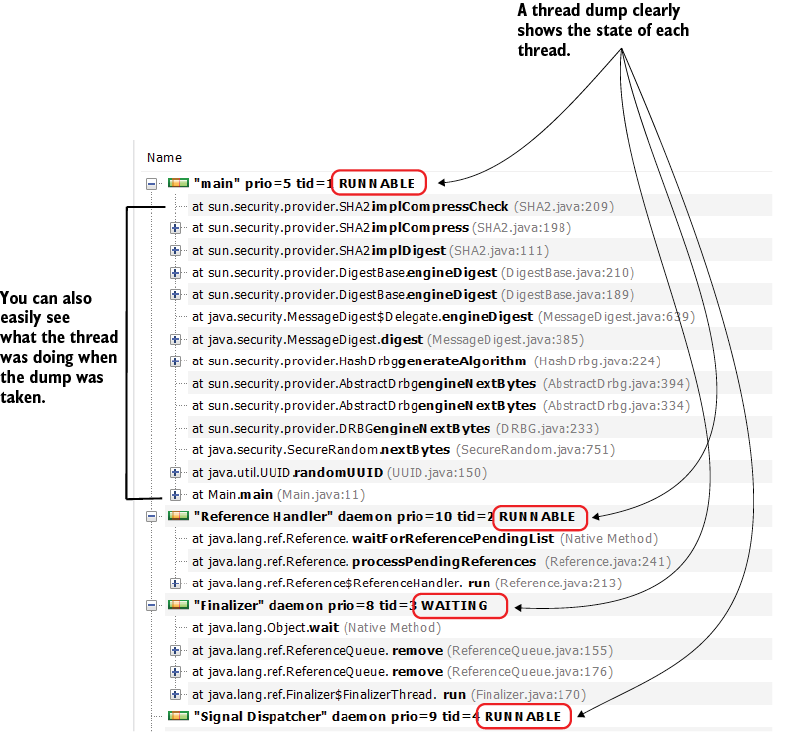
Inspect a thread dump to connect thread states and stack traces with blocked execution, stuck applications, or performance problems. section 1.3






















