Artificial intelligence (AI) refers to systems that can assist with intellectual and creative work: researching, generating drafts, understanding and producing language, analyzing designs, and suggesting improvements. For website work, AI can speed up planning and polishing, but it works best when you supply the goals and judge the results. section 1.0 section 13.3
Think of AI as a capable junior assistant rather than an automatic replacement for your judgment. Give it a project, constraints, and examples; review several possible results; select the strongest option; then ask for revisions, evidence, or fact-checking. This shifts your work toward directing, evaluating, and refining. section 1.2.3 section 1.5.2
The practical interface is prompting: describing a task in natural language. Specific details bring a response closer to the intended result, while follow-up questions let you redirect a result that is vague, unsuitable, or wrong. AI can also ask clarifying questions before answering, turning one request into a guided conversation. section 1.3 section 1.5.2
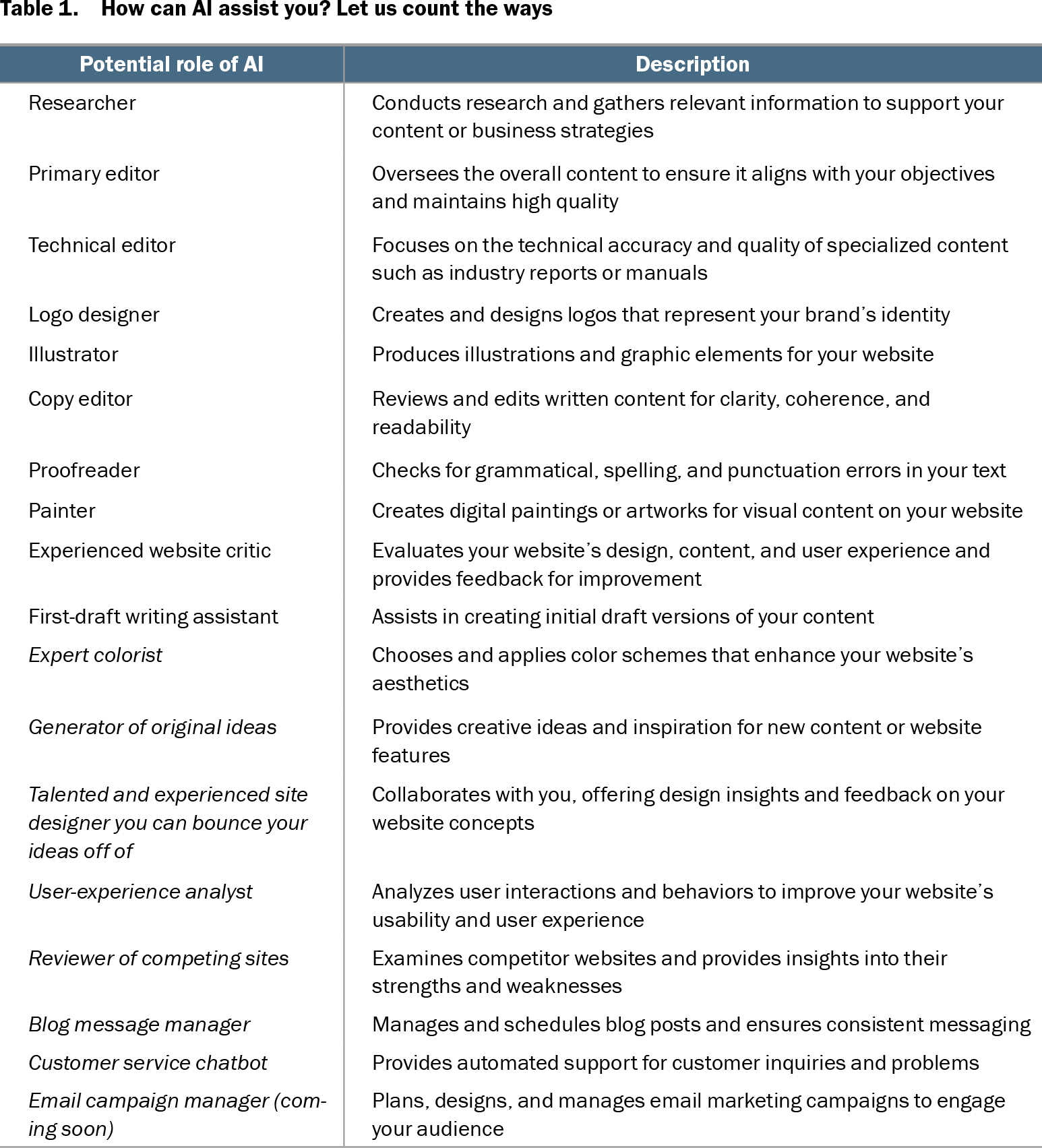
For a website, AI can take on roles such as:
- Researching relevant information and competitors. section 1.2.2 section 6.9
- Drafting, editing, proofreading, and brainstorming content ideas. section 1.2.2 section 1.4.2
- Creating logos, illustrations, and other visual content. section 1.2.2
- Critiquing a home-page image or layout against successful competing designs. section 6.9 section 6.9.3
- Helping plan blog posts, audience interactions, e-commerce tactics, and search visibility. section 9.0 section 10.0 section 11.0
Example: ask for a design critique
Upload a home-page image and ask AI to compare it with several strong sites in the same area. Request the shared design strengths, the differences in your page, and a prioritized list of improvements. Then inspect the advice yourself: a suggestion may reveal issues with typography, image relevance, placement, proportion, or consistency, but the final design decision remains yours. section 6.9 section 6.9.3
AI includes several connected domains. Machine learning describes systems that learn; deep learning uses multilayer artificial neural networks to learn from large amounts of data; robotics brings AI into physical machines; and natural language processing (NLP) focuses on understanding and generating human language. Prompt-based tools rely especially on language interaction. section 13.3
AI tools and capabilities change quickly. Different systems are presented for different strengths, including text improvement, content generation, search-oriented answers, image generation, large-text work, and up-to-date information. Keep learning, compare tools for the task at hand, and continue checking important output rather than treating any response as final. section 13.0 section 13.1.1 section 1.5.2
Table 1.1 How can AI assist you? Let us count the ways (view table figure)
| Potential role of AI |
Description |
|---|---|
| Researcher |
Conducts research and gathers relevant information to support your content or business strategies |
| Primary editor |
Oversees the overall content to ensure it aligns with your objectives and maintains high quality |
| Technical editor |
Focuses on the technical accuracy and quality of specialized content such as industry reports or manuals |
| Logo designer |
Creates and designs logos that represent your brand’s identity |
| Illustrator |
Produces illustrations and graphic elements for your website |
| Copy editor |
Reviews and edits written content for clarity, coherence, and readability |
| Proofreader |
Checks for grammatical, spelling, and punctuation errors in your text |
| Painter |
Creates digital paintings or artworks for visual content on your website |
| Experienced website critic |
Evaluates your website’s design, content, and user experience and provides feedback for improvement |
| First-draft writing assistant |
Assists in creating initial draft versions of your content |
| Expert colorist |
Chooses and applies color schemes that enhance your website’s aesthetics |
| Generator of original ideas |
Provides creative ideas and inspiration for new content or website features |
| Talented and experienced site designer you can bounce your ideas off of |
Collaborates with you, offering design insights and feedback on your website concepts |
| User-experience analyst |
Analyzes user interactions and behaviors to improve your website’s usability and user experience |
| Reviewer of competing sites |
Examines competitor websites and provides insights into their strengths and weaknesses |
| Blog message manager |
Manages and schedules blog posts and ensures consistent messaging |
| Customer service chatbot |
Provides automated support for customer inquiries and problems |
| Email campaign manager (coming soon) |
Plans, designs, and manages email marketing campaigns to engage your audience |
Browse a role-by-role menu of ways AI can assist with research, editing, design, and website production. section 1.2.2