Monitoring means watching activity over time so unusual events do not disappear into everyday work. Systems, applications, devices, and security tools generate logs: records of events such as logins, file access, and configuration changes. Looking at a sequence of records can reveal a problem that one event alone might not show. section 12.6.2 section 10.4
An access log can show when an action occurred, who performed it, how they authenticated, what they did, and where the request originated. Together, log records form a chronological audit trail. That trail helps investigators reconstruct incidents and helps organizations demonstrate compliance. Because an attacker may try to change or erase it, logs need protection against unauthorized modification or deletion. section 10.4.1
A sign worth investigating
Several failed login attempts in a row from the same account or network location may signal a brute-force attack. A sudden traffic spike or unusual access to sensitive files can also warrant attention. These patterns are indicators to investigate, not proof of a breach by themselves. section 12.6.2
Monitoring draws on different views of activity:
- For physical access, compare access logs with security guards, cameras, and alarms to understand movement into facilities or rooms. section 9.4
- For privileged access, record why elevated permissions were needed, what was granted, who approved it, how long it lasted, and what actions followed. section 10.4.4
- For sensitive data, monitor flows across networks, endpoints, and applications for unauthorized movement out of the organization. section 14.3.7
When an organization has many users and systems, checking each log separately becomes difficult. A security information and event management (SIEM) system brings logs from multiple sources together, analyzes and correlates them, and alerts analysts to suspicious activity. Analysts still investigate the alert; a security orchestration, automation, and response (SOAR) platform can complement SIEM by automating predefined response actions. section 10.4 section 12.6.3
Figure 10.3 Example of a Windows access control log record
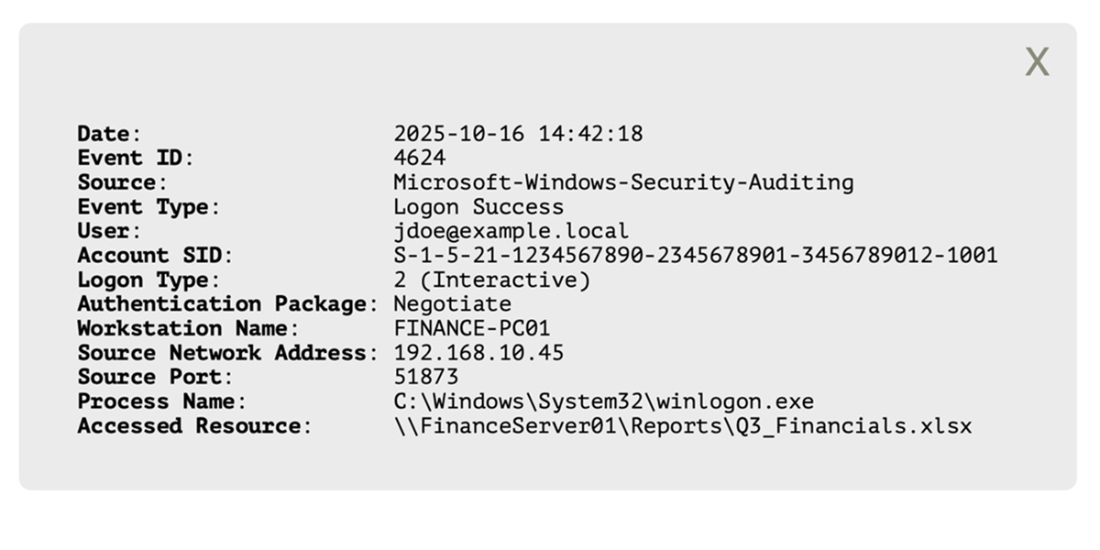
A Windows access log record provides a concrete example of the details to check: time, user, logon method, resource accessed, and originating device. section 10.4.1